
Wallets
Your agents pay from two kinds of wallet. A third, the vault, lives on your machine and signs the steps only you take.
| Wallet | What it is | Who signs | Plan |
|---|---|---|---|
| The embedded wallet | Your Candle account’s own wallet. Every agent you allow pays from it. | Candle | Any |
| A TEE wallet | A wallet of its own for one agent’s key. | Candle’s secure enclave, through your own candle CLI | Pro or Max |
| The vault | Keys kept encrypted on this machine, unlocked by your passphrase or a security key. | You, on this machine | Any |
Custody tiers: the vault and TEE wallets explains the vault and TEE wallets from Candle’s side.
The embedded wallet
Section titled “The embedded wallet”A new agent key can’t pay from any wallet until you allow one. Setup allows the embedded wallet for you: in the pane, you type the key’s prefix back to confirm it. Every agent you allow shares it, so the panes group positions by wallet and name the agents on each.
Trades from the embedded wallet fill in about 3 to 6 seconds.
TEE wallets
Section titled “TEE wallets”A TEE wallet belongs to one agent’s key. It needs Pro or Max, and a vault on this machine with a key holding some SOL: the new wallet is promoted from that vault key, which pays its rent, then funded from it. Setup’s wallet step does this, or ask the agent for a new wallet for an agent; each step runs in the prompt pane as you. For a rules bot or a trigger, a TEE wallet used for nothing else fences what it can lose, and its figures are its own.
- Trading from it: the Candle Harness runs your own
candleCLI with the agent’s key, on the same one-press card, with the same limits, kill switch and Journal. Fills take about 5 to 11 seconds. - A trade that wasn’t answered is read back from Candle under its id, and never sent twice.
- Stopping it is final.
candle tee disablestops a TEE wallet for good: the CLI can’t turn it back on. The kill report offers this as stop it for good, and the card says so in amber. A stopped wallet stays on the Wallets pane until you sweep it home withcandle tee sweep, since Candle drops it from every list. The pane shows what’s still in it, read from the chain over your Solana RPC. A wallet stopped outside the Candle Harness shows too, as “no longer listed by Candle”, once Candle’s lists have left it out twice in a row.
Which wallet pays
Section titled “Which wallet pays”For each trade, in order:
- the wallet the trade names:
buy $25 MOON from embedded, orfroma wallet’s name or address; - else the agent’s own default,
[agents.<name>] walletinconfig.toml; - else the embedded wallet, when the agent’s key may pay from it.
The card always names the wallet that pays. ctrl-o on a card lists the agent’s other wallets as chips; a click makes a new card for the same trade from that wallet, at a fresh price, and withdraws the old one. A wallet the agent can’t pay from is refused before anything is sent, saying why.
A trade pays from a wallet on its own chain. A Hood token (a 0x… address) pays from the account’s embedded Hood wallet, and a Solana token from a Solana wallet. A wallet on the other chain, named or set as the agent’s default, is refused before anything is sent, never swapped for another. The embedded wallet’s two addresses are one wallet to from embedded, and to a default of embedded: either takes the one on the trade’s chain. On paper, either address is the embedded wallet.
The Wallets pane
Section titled “The Wallets pane”Each wallet, the agents that pay from it, its balance, and a ⧉ to copy its address.
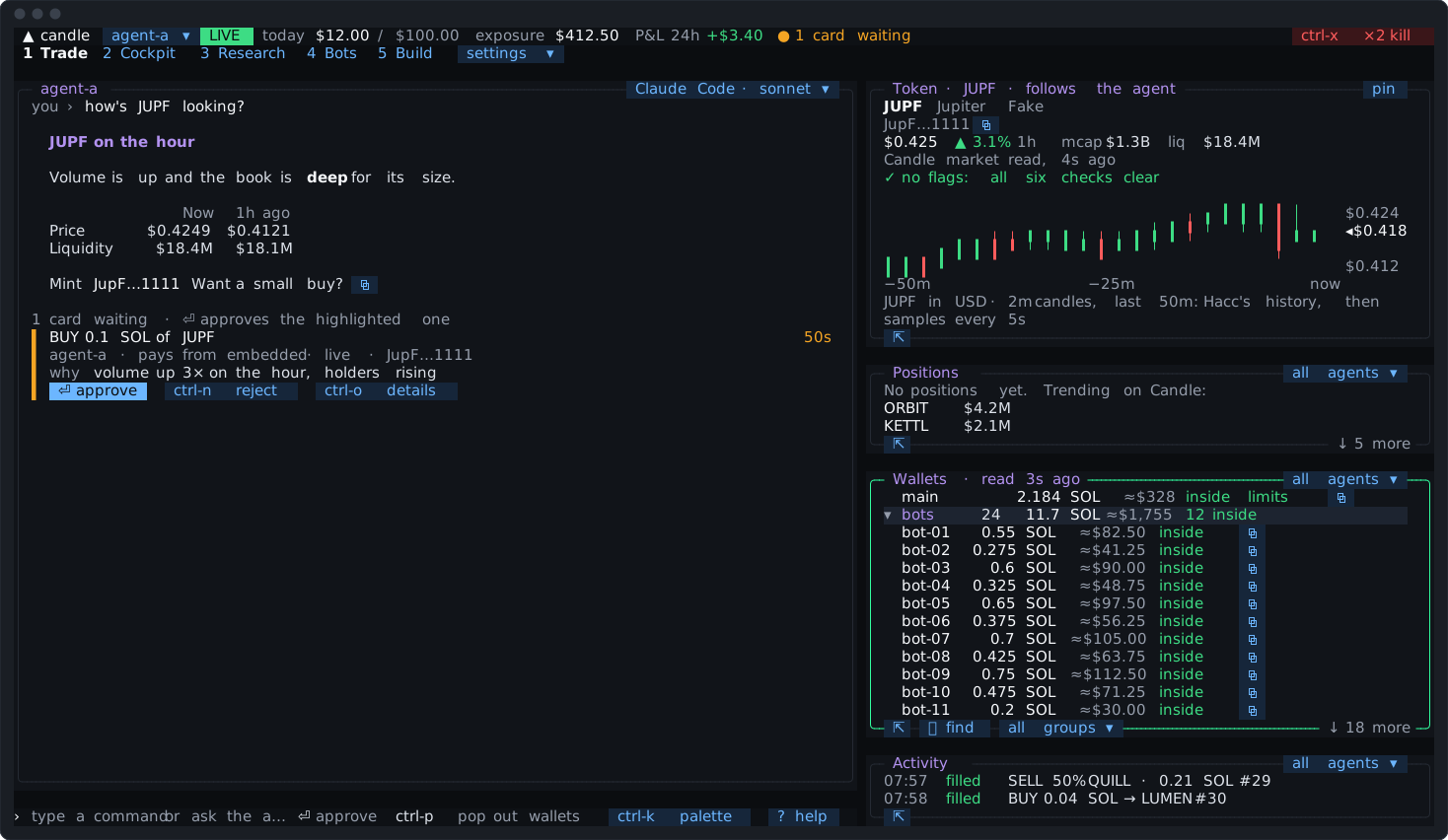
Which wallets show is a setting, on the pane’s chip or in config.toml’s [wallets] show:
- active (the default): the wallets a Candle Harness agent can pay from;
- all of the account’s wallets;
- one group of yours;
- a list of up to 20 wallets.
A wallet the Candle Harness stopped always shows until it’s swept. The agent can change which wallets show when you ask.
Each wallet goes by one name everywhere, kept where it’s owned:
| Wallet | Its name is kept | Who sees it | A rename |
|---|---|---|---|
| A TEE wallet, or one you imported | On Candle, as its label | The Candle Harness, the candle CLI and Candle’s app | Runs Candle’s tee rename in the prompt pane |
| A vault key | In the vault on this machine | The Candle Harness and the candle CLI on this machine | Runs vault rename in the prompt pane |
| The embedded wallet, and anything else Candle holds no label for | In the Candle Harness’s wallets.toml, beside config.toml | The Candle Harness on this machine only | Changes at once |
So a TEE wallet renamed here is renamed for everyone on the account, and the embedded wallet’s name is yours alone.
To rename one, type name <wallet> <new name>, click the Wallets pane’s name chip, or ask the agent. The Candle Harness’s own names change at once. Candle’s and the vault’s run Candle’s own tee rename or vault rename in the prompt pane. The palette’s name several wallets picks several, then changes their shared start for all of them, as one batch with a preview first.
A name follows Candle’s rule (at most 64 characters, no space at either end), is unique across every wallet, and is never embedded, an agent’s name, or anything shaped like an address. A trade can then name its wallet by it: buy $5 of MOON from hot. A name never makes an address a known destination for sending funds.
Groups
Section titled “Groups”With many wallets, groups keep the panes readable. A group is defined in wallets.toml:
- by a name’s start, as Candle picks many:
group bots prefix bot-takes in every wallet whose name startsbot-, now and as more are made; - by hand:
group swing add alpha; - or both.
The Wallets pane and the approvals menu then list by group, one group open at a time, with ⌕ find across them all, and P&L adds each group up. The agent can make and change groups when you ask, with an undo.
A group organises; it never pays. from bots is refused, naming a wallet in the group, and each wallet keeps its own approvals setting.
Empty token accounts
Section titled “Empty token accounts”A TEE wallet’s sells leave empty token accounts behind, each holding about 0.002 SOL of rent. The Wallets pane counts them, as Candle’s own preview does: 3 empty token accounts · 0.00611 SOL back. Its close chip, a typed close, or the agent closes them, and the rent returns to the same wallet. The agent’s close is a one-press card. The count is read in the background, never when you trade.
Closing the embedded wallet’s empty accounts needs a key with transfer access, which an agent key doesn’t have, so the Candle Harness doesn’t offer it.
The vault
Section titled “The vault”The vault is optional. The embedded wallet trades without one, and you can add one any time from settings ▾.
With a vault on this machine:
- owner steps (making or changing keys, wallets and access) take its factor first: your passphrase, or a security key;
- TEE wallets can be made from its keys;
- funds out can be sent from the Candle Harness, signed by the vault (Safety).
Without one, owner steps run in the prompt pane with no factor, and the card says so. Once the Candle Harness has seen a vault on this machine, owner steps always take its factor, and a missing vault refuses them, naming candle vault restore. If you removed the vault on purpose, forget vault tells the Candle Harness so.
Going further
Section titled “Going further”candle-harness doctornames each wallet’s setting, the TEE wallets’ signers on this machine, any wallet stranded by a key you revoked, each agent’s default wallet, and the empty accounts.- Revoking a key, or narrowing which wallets it may pay from, so that a TEE wallet would be left with no key, says so on the card before you approve it.