
Code bots
A code bot is a program of yours, in a folder of yours, that trades through the Candle Harness. You or your coding harness write it in the Build tab, in any language that can speak the bot protocol, with the TypeScript client the Candle Harness ships. Your press on its card saves it; then the core runs it, restarts it after a crash, and holds every trade it sends through the core to the figures you approved.
A rules bot is a Hacc strategy definition the core runs for you. A code bot is code: whatever logic you want, with the same rules on its trades. Both show on the Bots tab, and everything on this page about the kill switch, Candle’s circuit breaker and a wallet of its own holds for both.
Code bots need a Pro or Max plan. On Free none runs, a bot’s token is refused, and the Build tab and Bots tab say so, with a chip that types candle plan buy. If your plan ends, every code bot’s buys are held; its sells of its own, and the exits the core holds for it, still run. The Bots tab still lists each, with what it holds, under the plan’s words.
What protects you
Section titled “What protects you”A code bot is given no key. It trades with a token of its own, through the core, and every trade it asks for is the core’s own proposal, made with what its card approved:
- Its figures: the most a trade may spend, the most its buys may spend in a day, and how many positions it may hold at once. A buy over one is refused, naming which, and nothing is sent.
- Its run settings: paper or live, the wallet it pays from, its agent and its slippage bound. A request can’t name any of them; one that tries is refused.
- The wallet’s setting: its buys follow the wallet, as everyone’s do. Inside the wallet’s figures a buy runs with a receipt; over them, or on a wallet that asks every time, it’s a card that waits for your press.
- Its agent’s limits, Candle’s caps on the key, the kill switch and the pace that keeps clear of Candle’s circuit breaker hold it as they hold every trade (Limits).
What it trades inside those is its code’s: the card says so, “The core holds this bot to these figures. What it trades inside them is its code’s.”
A code bot is a program you run, trusted like any program you run as yourself. It can read what you can read on this machine, your key files included. The core holds the trades it sends to its figures; it doesn’t confine the program. So run only code you’d run in your own terminal (Safety).
A wallet of its own first
Section titled “A wallet of its own first”As for rules bots, a live code bot is best on a wallet of its own: a new TEE wallet funded with what you’re willing for it to lose, set to trade inside limits. It fences the risk, its figures bound its buys alone, and its book is exact. The card offers one where its wallet is shared or asks every time, and so does the bot on the Bots tab. Rules bots has the steps.
Its card
Section titled “Its card”A code bot is proposed by your coding harness in the Build tab (candle-harness build propose), and the card opens over the screen there. It shows:
- its name, its agent, the wallet it pays from, and paper or live;
- what it runs: “Runs
bun run bot.tsin~/candle-bots/momentum”; - a box saying how its trades run: its buys (inside its figures, or a card each time on a wallet that asks), its sells (of what it bought, with no card), its limits (“$2.00 a trade · $10.00 a day · 3 open at most”) and its worst case;
- its slippage bound, in amber when it’s looser than the default, or tighter than it (“under the route’s 1%: its sells may not fill”);
- a wallet of its own, suggested where its wallet is shared or asks.
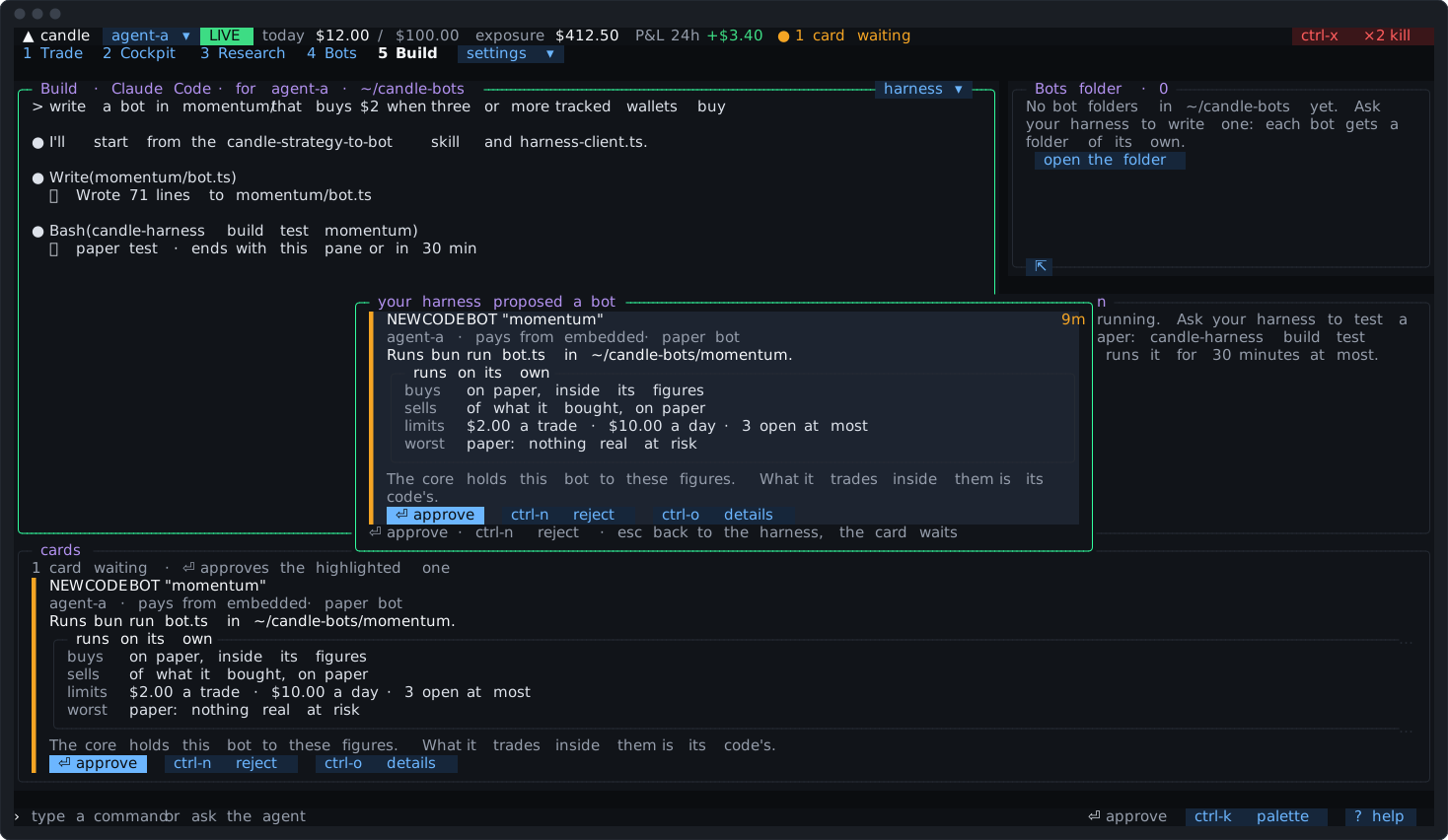
On a short terminal the card is drawn tight, one line a part, so what your press approves stays on it.
The card approves its run settings, not its code. Edit the code as often as you like: no card. Each time the core starts the bot it records a hash of the bot’s own files and of its lockfile. Dependency folders (node_modules, a virtual environment and the like) aren’t hashed: the lockfile stands for them. A command whose program is a file outside the folder has that file hashed too. When the hash differs from the last start’s, the Journal and the bot’s log say its code changed. Changing a setting:
- at once: a lower figure, fewer open at most, a slippage bound tightened as far as the route’s default (1% from the embedded wallet, 0.5% from a TEE wallet);
- a new card: a higher figure, a looser bound or one under the route’s default (a bound that tight can make its sells fail), going live, going back to paper, another wallet, folder or command;
- refused: a bound under 0.1%, and a folder that’s
/, your home or a folder holding it, or one of the Candle Harness’s own folders (settings, state and the agents’ research folders) or inside them. The folder is checked where it really is, links followed, when the bot is proposed, approved and each time it starts: code there could come from an agent’s files.
A change you approve keeps a bot you paused or stopped as it was, and its card says so: putting it back on is your own click. It withdraws any buy the bot asked for under the version before (a card from the old wallet can’t be pressed after), and tells the bot. A bot’s day figure counts the mode it runs in now: moved from live to paper, it starts a paper day.
The agent can lower a code bot’s figures at once and pause it, but never makes one or raises a figure: that’s the Build tab’s card. A popped-out view, a turn a trigger woke and the bot itself can’t make, widen, take live or put back on a bot either.
How its trades run
Section titled “How its trades run”| What happens | |
|---|---|
| A buy | Sized in dollars. Checked against its trade’s figure, its day’s (buys and swaps since local midnight) and open at most, then follows the wallet: a receipt inside the wallet’s figures, a card over them or on a wallet that asks |
| A swap | Between base assets (SOL, USDC, CNDL, ETH, USDG), live only. Valued as its card would be, and held to its figures as a buy |
| A sell | Of its own positions only, with no card on any wallet, as a rules bot’s exit. All of a position, a percent or an amount of tokens. More than it holds sells what it holds and says so. A second sell of a position while one is under way is refused |
Nothing is sent twice. Each trade carries the bot’s own request id, recorded before anything is proposed. Asked again under the same id, after a lost answer or a restart, the core answers what became of it. A request recorded but never sent before the core stopped ends as lost, and is said once.
A sell only of its own. The bot’s book is the core’s count from its own fills. Another bot’s position, or anything you or the agent bought, is never its to sell. From the embedded wallet, for a token Candle didn’t launch, it sells a whole percent of the wallet’s balance as rules bots do (Rules bots).
Exits the core holds
Section titled “Exits the core holds”A buy may carry exits for the core to watch: a take profit, a stop, a max hold in hours, or a trailing stop, in a rules bot’s exit shape. A bot can set, change or clear them later on any position it holds.
The core watches them as it watches a rules bot’s exits: on Candle’s own price, read after the position’s buy filled, about every 5 seconds, selling with no card on any wallet. They run while the bot is paused, crashed or not connected, and through the kill switch. So a crash never leaves a position unwatched. The bot is told each time one fires, and how its sell ended.
- A held exit never sells at the same moment as the bot’s own sell of that position: one waits for the other.
- You can remove a position’s held exits on the Bots tab (
remove its exits, which asks once). - Stopping the bot stops its held exits too, as stopping a rules bot does: its positions are left to you. Pausing it, a crash and the kill switch don’t.
- A bot that wants its own exit logic sends none, and sells itself.
Running it
Section titled “Running it”The core runs every code bot you approved: its command in its folder, with no shell, in a process group of its own, with a clean environment and a fresh token. Each start replaces the last token, so an earlier copy of the bot can’t trade through the core. Stopping its process, a clean exit, and giving up after crashes end its token too.
- After a crash it’s started again after 2 seconds, then 4, 8, 16, 32, then a minute between; ten minutes running resets that. After five crashes in ten minutes it stops trying, tells you, and stays stopped (across a restart too) until you start it.
- A clean exit isn’t a crash: it isn’t restarted until you start it, or the next core does.
- It ends with the core and starts again with it. If the core is killed, the next core ends the bot it left running (once it’s checked that’s the bot) before starting it again.
- Its log: what it prints, the last 5 MB, with the core’s own lines (started, ended, warnings) among them. Before a line is kept, colours and other control sequences are removed, and any key or token in it is taken out; a private key printed over several lines is left out whole. At most 2 MB a minute is kept; the rest is counted.
- Its memory and CPU are checked once a minute. Over 1 GB, or 90% of a core across the minute, it’s said on the Bots tab until it falls back.
A code bot that’s on keeps the core running after you quit, as rules bots and triggers do; candle-harness stop ends the core and every bot’s process with it (Triggers).
Running it yourself
Section titled “Running it yourself”A bot can run outside the Candle Harness on the same machine: under launchd or systemd, in tmux, or in your editor’s debugger. candle-harness bots token momentum ends its process here, makes it a new token, and writes it with the socket’s path to .harness-bot.json in its folder, readable by you alone. It’s never shown on screen. In your bots folder, the .gitignore the Candle Harness wrote keeps it out of git; in a folder of your own, add .harness-bot.json to its .gitignore yourself. bots token says so when the folder’s git doesn’t ignore the file. The client reads that file from the folder it runs in.
It then shows as “runs outside” on the Bots tab, connected or not. Its trades follow the same rules; there are no restarts or log here. candle-harness bots start momentum brings it back under the core, with a new token.
Approving a new folder or command for a bot that runs outside withdraws its token, and the Bots tab says so: bots token writes a new one in the new folder, or bots start runs it here.
From a terminal
Section titled “From a terminal”| Command | What it does |
|---|---|
candle-harness bots list | Every bot: each code bot’s state, figures and process |
candle-harness bots start <name> | Runs a code bot’s process here: after it crashed too often, was stopped, or ran outside |
candle-harness bots stop <name> | Ends its process. The bot stays on, and the exits the core holds still run |
candle-harness bots restart <name> | Ends its process and runs it again, with its code as it is now |
candle-harness bots token <name> | For a bot you run yourself: its token, written to .harness-bot.json in its folder |
candle-harness bots logs <name> [-n N] | The end of its log, 200 lines or N |
candle-harness bots init [folder] | Writes a bots folder (The Build tab) |
They need a running core, but for logs and init. None of them puts a stopped bot back on or stops its trades: that’s yours, from the main window.
Pausing, stopping and changing one
Section titled “Pausing, stopping and changing one”| What it does | Who | |
|---|---|---|
| Pause | Its buys are refused. Its sells of its own and the exits the core holds still run. | you, from any view, or its agent |
| Back on | Back as you approved it. | you, from the main window |
| Stop | Nothing it asks for trades, and its process ends. The exits the core holds stop too: its open positions are left to you. | you, from the main window |
| Flatten | The core sells every open position of its own now, with no card, whether its process runs or not. A sell the bot already has under way is left to finish. The bot stays on, so its code may buy again at once; the question offers pause, then flatten, which pauses its buys before the first sell. Asks once. | you, from the main window, or the agent on a card |
| Remove | Takes it out and revokes its token. With positions open, it asks whether to flatten them or leave them to you. Positions left are yours from then on: a new bot of the same name starts with an empty book and an empty day, and the earlier one’s history is in the Journal. A flatten’s sell that fails after the bot is removed isn’t tried again: those tokens stay in the wallet, yours to sell. | you, from the main window |
The bot’s own controls. What a bot reports may offer up to four controls, a pause or new figures (“$1.00 a trade”). Each shows as a chip under what it says: one that pauses or lowers a figure takes at once on your click; one that would raise a figure, loosen its bound or tighten it under the route’s default is a card. The bot can only offer them: the click is yours.
What the bot says
Section titled “What the bot says”A bot can report what it’s doing: a status line, its health (ok, warn or error), alerts, its rules in words, a few named counts, and events (what it considered, entered, skipped, exited). The Bots tab shows it under “the bot says · its own words, not the core’s count”.
Its figures are never its own report’s. Its P&L, positions, fills and balances on the Bots tab and the P&L tab are the core’s count from its own fills. A report with a field or a count named as one of them, however it’s spelt (“P&L today”, “profit”, “balance”), is refused whole. That keeps a bot’s count from being taken for the core’s. What the bot writes in its own lines is shown as the bot’s words, under that heading, and isn’t checked.
A report lives in memory: a bot says it again when it reconnects.
Asking for a look
Section titled “Asking for a look”A bot can say one word and a line, such as needs-a-look and “spread above 8%”. A trigger set as on bot "momentum" says "needs-a-look" fires on it, with its cooldown, the wake caps and the kill switch, to notify you or wake an agent for judgment (Triggers). The line reaches a woken turn fenced as data. A bot can say a word once every 10 seconds, and 30 words a minute. Triggers on entered, exited and paused work for code bots too.
The kill switch
Section titled “The kill switch”ctrl-x twice holds every code bot’s buys and swaps until you resume, and tells each bot. Its sells of its own, and the exits the core holds for it, still go. The kill report names each code bot it holds, and what still sells for it. Resuming leaves each bot as it was.
Candle’s circuit breaker
Section titled “Candle’s circuit breaker”A code bot trades with its agent’s key, so the pace that keeps rules bots and triggers clear of Candle’s breaker holds code bots too: 20 trades in any 75 seconds on a key across every bot and trigger, buys at most 15 of them, and a waiting sell first. Past it, a bot’s buy is refused, saying when to try again; its sells wait for room. After two failed sells of a token on the key, the next waits, with retry on the Bots tab. Your trades and the agent’s never wait. Rules bots has the whole rule.
The Bots tab
Section titled “The Bots tab”Code bots sit in the Bots tab’s list after the rules bots, each with agent · wallet · code, or what’s wrong first: crashed, starting again, its process stopped, not running, or run outside and not connected. A bot that crashed five times in 10 minutes isn’t started again: its dot turns red, and the tab’s heading counts it as crashed, not on, until start runs it again.
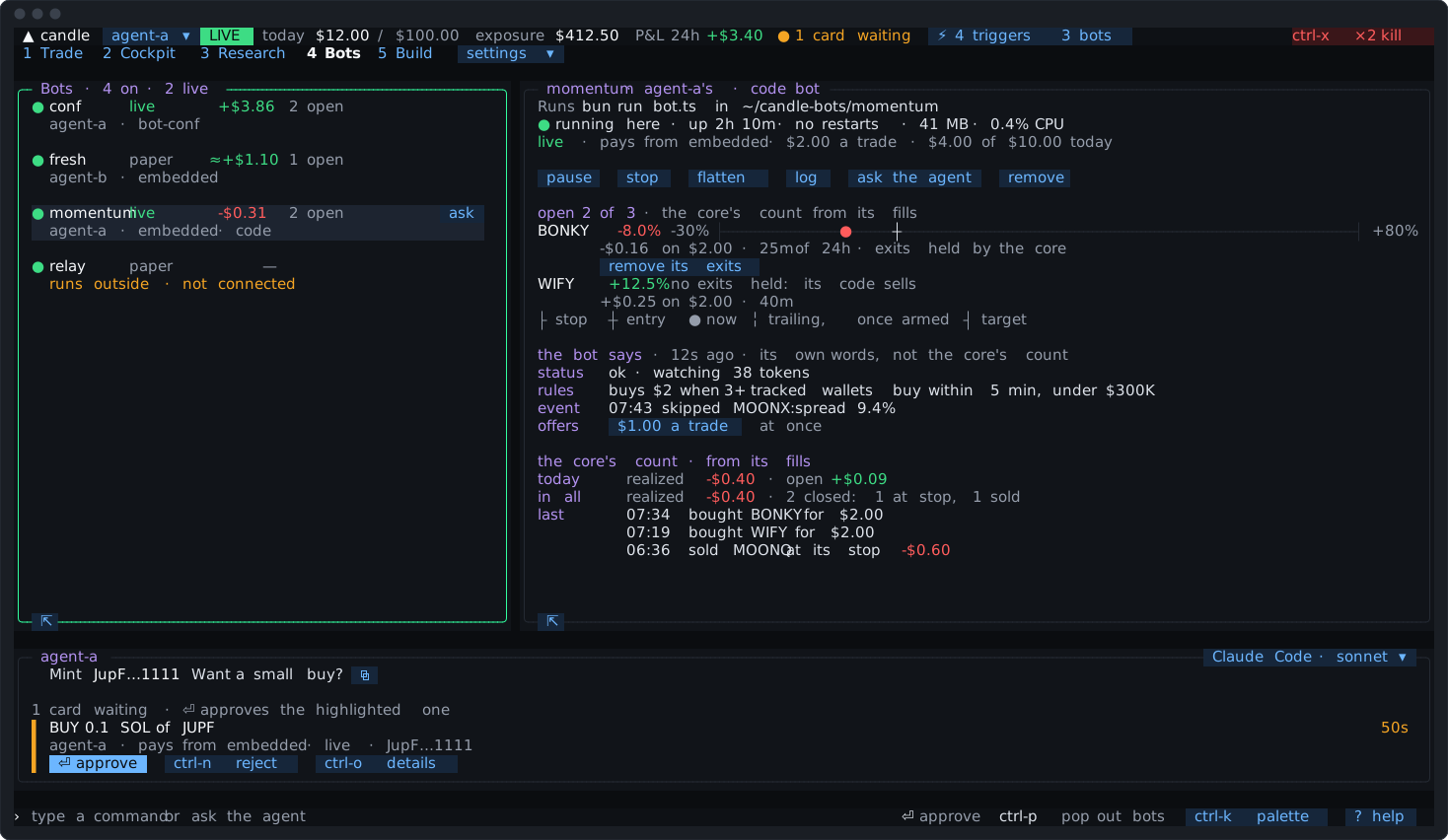
The one you pick, in one column:
- what it runs and where, and its process: “running here · up 2h 10m · no restarts · 41 MB · 0.4% CPU”, or run outside, connected or not, or the supervisor’s words for a crash or a stop. A paused or stopped bot whose process still runs says “its process is up · takes no buys while paused”;
- paper or live, its wallet, a trade’s figure and today’s use of its day’s: “$4.00 of $10.00 today”;
- its chips: pause or back on, stop, flatten,
retrywhere a held exit’s sell waits,start itwhere its process isn’t running,log, ask the agent, remove; - each open position: on a line from its stop to its target where the core holds its exits, with
remove its exits; otherwise “no exits held: its code sells”; - the bot says, with the controls it offers;
- the core’s count: today, in all, and its last fills.
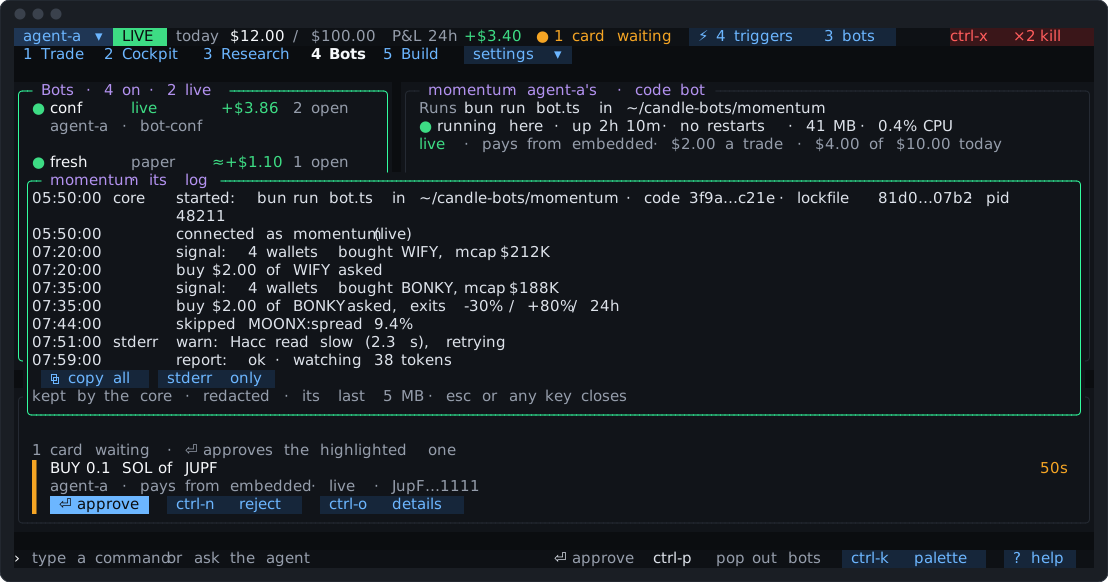
log opens its last 2,000 lines over the screen, newest at the foot, each with its time and stderr or core marked, with ⧉ copy all and stderr only. Esc or any key closes it. candle-harness bots logs reads further back. A bot you run yourself has no log here.
Where it shows
Section titled “Where it shows”- Activity folds a code bot’s trades into one line with its held exits; a waiting card, a crash, giving up and a warning stand alone.
- The Journal’s
botskind has every code bot’s requests, starts, crashes and changes, in words. - Receipts and cards it causes name it, so nothing it did reads as yours.
- The agent’s record (
harness_history) marks “your code bot”. - The P&L tab lists each code bot’s figures from its own fills, marked “code bot”.
- The note when you come back has its trades, waits, crashes and book (While you were away).
- Notifications: a card waiting or a request ending badly at once, a crash and giving up once, and fills folded per bot every 5 minutes, under
botsin[notify] on.
The agent and code bots
Section titled “The agent and code bots”Through harness_bots, the agent reads every code bot (its figures, how its trades run, its process, the core’s count and its held exits) with what the bot says fenced as data, never as instructions. It may pause one or all, lower a figure at once, and flatten on a card. It can’t make a code bot, raise a figure, take one live, or remove held exits.
bots.toml
Section titled “bots.toml”Code bots are kept in bots.toml with rules bots, as kind = "code", with folder, command (a list of words), agent, wallet, mode, state, perTradeUsd, perDayUsd, maxOpen and maxSlippageBps. The Candle Harness writes it when you approve, change, pause, stop or remove one. A name is one bot’s, of either kind.
An edit by hand can’t add a bot or widen one. A code bot changed by hand has its buys held until it’s approved again on a card; its sells of its own still run. The core always runs the folder and command you approved, never one written into the file by hand. Configuration lists the keys.
What candle-harness doctor says
Section titled “What candle-harness doctor says”Under bot, each code bot: paper or live, what it does now, its agent and wallet, and its open positions; its process (running, crashed and starting again, given up after five crashes, even with no core running); its folder if it’s gone; a bot you run yourself with no token yet, or not connected; a memory or CPU warning; and the exits the core holds for it, selling or waiting. Each comes with what to run. Troubleshooting has the fixes.