
Safety
The Candle Harness’s rules are held by its core, the one process on your machine that holds keys and trades. No engine, preset or prompt can step round them.
The kill switch
Section titled “The kill switch”ctrl-x twice, from anywhere, or a click on ctrl-x ×2 kill in the status bar’s corner. kill on the input line does the same.
“Anywhere” includes the Build tab’s terminal and the prompt pane, where every other key belongs to what runs there: the first ctrl-x goes to that program, and a second straight after pauses. It also holds on a terminal too small to draw the screen. There the Candle Harness says how many cards wait and that ctrl-x ×2 still kills, and ⏎ approves nothing until the screen is back.
At once:
- buys pause for every agent;
- the agent’s turn stops;
- buy and swap cards are withdrawn, along with launches, stakes, profile edits and new posts;
- each open sell gets a fresh card at a fresh price, one press away. Getting out is never blocked;
- triggers are held: their buys, swaps and wakes wait until you resume, and their sells still go;
- rules bots are held: no new entries until you resume, and their exits still sell;
- code bots are held: their buys and swaps are refused until you resume, and each is told; their sells of their own, and the exits the core holds for them, still go.
A report says what it did: what it stopped and withdrew, the sells still open, the triggers and bots it holds, where you stand, what each agent spent today, and what it couldn’t stop.
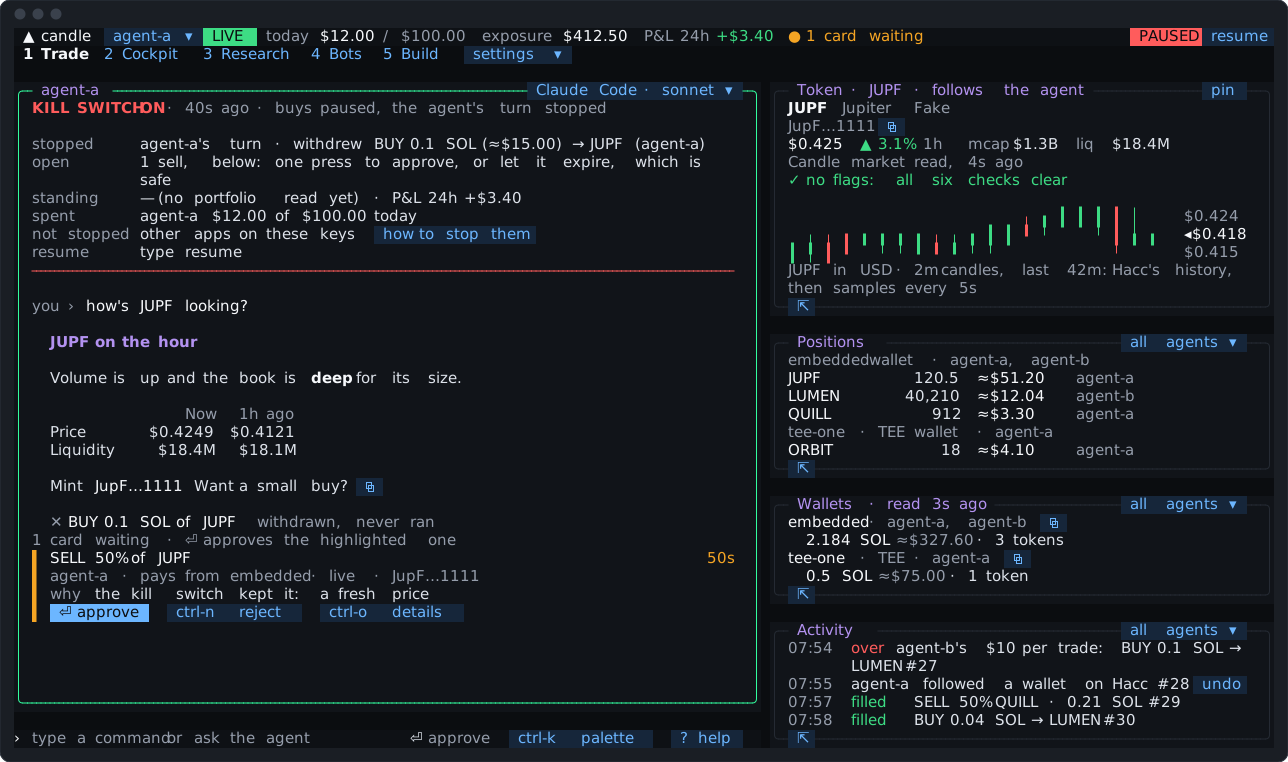
resume, typed, or a click on PAUSED in the status bar, turns buys back on. The pause holds across a restart.
If the pause can’t be written to disk (a full disk, a state folder that can’t be written), it still holds now, and the report says in amber that it’s not saved, so it wouldn’t survive a restart. Press the kill switch again once the disk can be written: each press tries the save again.
What it can’t stop is anything that doesn’t run through the core: the candle CLI in another terminal, a script or app using the same key, Candle’s web app. The report says so and offers how to stop them. For a TEE wallet, the report offers stop it for good, which runs Candle’s tee disable in the prompt pane. That stop is final.
Agent keys
Section titled “Agent keys”Each agent trades with a Candle key of its own, with Write access: it can trade, but it can’t move funds out.
- The key never reaches the agent or the screen. Setup makes it in a pane and stores it straight into the Candle Harness.
candle-harness key add --agent <name>takes one from standard input or a hidden prompt, never as an argument, so it isn’t left in your shell’s history. - It’s kept privately in the Candle Harness’s state folder, readable by your user only.
- A message holding something shaped like a key never reaches the agent’s engine, and keys are scrubbed from what the Candle Harness records.
- Keep the master copy in your password manager. The Candle Harness never shows it again.
candle-harness doctornames any agent key with Withdraw access, with the command that narrows it.
Bots are given no key. A code bot trades through the core with a token of its own, made fresh each time the core starts it, ended when its process stops, and revoked when you remove it. The Build tab’s coding harness gets a build token that can read books, test a bot on paper and propose one, and nothing else; it’s revoked when the pane closes. A token reaches only that, and the core keeps only its hash. Both are still programs you run, as Your files says.
The Candle Harness never changes your keys by itself. It never replaces, rebinds or revokes a key or a wallet’s binding unless you run the step. Where a step would follow, it offers a chip that types the exact command, for you to send.
The prompt pane
Section titled “The prompt pane”Owner steps, and anything that asks for a passphrase or shows a secret, run in a pane of their own, as you. That covers making or revoking keys, the vault’s steps, importing a wallet, showing recovery words, signing and sending funds.
- Nothing shown or typed in the pane reaches the core, the agent, the Journal or another view, except three things the Candle Harness reads back on purpose:
vault list’s addresses and labels (so a send can go to a wallet of yours by name), a new key’s prefix, and whether the vault opened. - An agent’s key never shows in the pane. For a step run as that agent, the pane hands it to
candleout of sight, as the core does. - From the agent, each of these is a card. Approving it opens the pane; typed by you, the pane opens at once.
- With a vault, owner steps take its factor first: your passphrase, or a security key. Without a vault, they run in the pane with no passphrase, and the card says so.
- Candle’s browser confirm. Where Candle asks for it, a step that widens a key’s reach also needs the account owner’s approval in the browser. The pane shows what you’re approving, the link and the code. Approve only a step you just started. Denied or expired, nothing changed.
- The card says what the step shows or takes, in amber: “Shows your 24 words.”
ctrl-]leaves the pane behind a chip, and brings it back.⏎oresccloses it once it has finished.ctrl-cat a passphrase prompt stops the step a second later.- What the pane runs is never sent again by the Candle Harness. A step that was stopped partway says what it may have done.
Funds out
Section titled “Funds out”Sending funds out of a wallet is something only you do. It runs in the prompt pane, signed by the vault on this machine: vault transfer, tee sweep and external sweep. The CLI asks for your passphrase itself, and for a typed confirm.
- The agent can propose a send only when you asked for it: your own message that turn must say where it goes and how much (or, for a sweep, which wallet and “everything”). Name two assets (“send 10 USDC and 1 SOL to cold”) and each amount goes with the asset said beside it.
- A turn a trigger woke can’t propose a send, since there’s no message of yours in it. Triggers and bots, rules and code, never send funds out.
vault demotefrom the agent needs your own words that turn naming each wallet, since it stops a TEE wallet for good. Its card says so in amber.- An address that looks like one of yours but isn’t (the same first and last four characters) is refused.
- A known wallet goes by its name, filled in as its address.
- A new address shows in amber, in groups of four, and only a click approves it, never
⏎. - The kill switch withdraws a waiting
vault transfer, and keeps sweeps, which send to your own vault.
Agent keys can’t send funds, since they’re Write keys. Commands that would send with an agent’s key say they need a Withdraw key.
What the agent never sees
Section titled “What the agent never sees”- its own key, or any other;
- your passphrase, recovery words, or anything in the prompt pane;
- files outside its research folder (unless you’ve turned its shell on: Your agent). A script it runs with the code runner is held to that folder by the operating system, with no network;
- your own setup of its harness: instructions, skills, plugins, hooks and MCP servers.
What it reads from Candle, Hacc, a post or what a code bot says reaches it cleaned of hidden and control characters, and marked as data, never as instructions. An instruction planted in a signal is reported to you, not followed. A page its engine fetches with the engine’s own web tools is the exception: it arrives as that engine gives it, and the Candle Harness doesn’t sit in between (Pi’s web_fetch is the Candle Harness’s own, and is cleaned).
What leaves your machine
Section titled “What leaves your machine”- Your conversation goes to your own model provider, through the coding agent you signed in to (Anthropic for Claude Code, OpenAI for Codex, xAI for Grok, or the provider you set up in OpenCode or Pi).
- Trades and reads go to Candle, with each agent’s own key.
- Signal and market reads go to Hacc, Candle’s data service, with the agent’s key.
- The agent’s web tools, on the engines that have them, reach the pages it looks up. The agent writes the addresses it fetches, so an agent steered by something it read could put what it has read this turn into one: wallets, balances, positions, notes. Never a key: its reads are held to its research folder. Activity and the Journal show each fetch with its full address, and
deny = ["web_fetch"]in an agent’s tool settings turns fetching off (Engines). - The Build tab’s coding harness runs as you, signed in to its own provider, as it would in any terminal: what you ask it goes there, under that harness’s own terms, with what it reads in your bots folder and through
candle-harness build(every bot’s book, a code bot’s log, its agent’s record). - A code bot of yours sends what its code sends. Its trades and reads through the core go to Candle and Hacc with its agent’s key; anything else it does is its own code’s.
- A TEE wallet’s trades go through your own
candleCLI, and its Solana RPC. A stopped TEE wallet’s balance is read over the same RPC. - Notifications stay on your machine: your computer’s own, or your terminal’s. Notifications into Quant, Candle’s Telegram bot, will go to Candle once Candle opens the route, with a short headline and no addresses or keys.
The Candle Harness sends nothing to anyone else, and keeps no record of its own outside your machine. It turns off the telemetry of the harnesses it can.
Your files
Section titled “Your files”Everything the Candle Harness keeps is in ~/.config/candle/harness/ (or CANDLE_HARNESS_HOME): your settings (triggers.toml and bots.toml among them), and a private state/ folder with the agents’ keys, the Journal, code bots’ logs, and the core’s socket. Your code bots’ code is in your bots folder (~/candle-bots unless you picked another), which is yours: the Candle Harness never writes over a file there you changed. Other users on the machine can’t reach the socket. A program running as you can, as the Candle Harness’s own view does: it can do whatever you can in the view, cards included. Run only what you trust under your user. That includes the Build tab’s coding harness and your code bots: they’re programs you run, trusted like any program you run as yourself, and they can read what you can read on this machine, your key files included. The Candle Harness gives them no key, and the core holds a code bot’s trades to its figures; it doesn’t confine the program. Only Candle’s caps on a key hold a program that uses the key file itself. Architecture has the detail.
A key pasted into the chat is refused, never sent to the agent or written to the Journal: a Candle key, or another service’s key or token by its shape (Anthropic, OpenAI, OpenRouter, xAI, GitHub, GitLab, Slack, AWS, Google, Stripe, Hugging Face), or a private key file, and a wallet’s private key (a Solana keypair, as base58, hex, base64 or its 64-number array) or recovery words (12 to 24 words whose checksum holds, numbered or labelled ones included). A bare 32-byte seed and an EVM private key aren’t recognised by shape, so never paste one.
Reporting a security issue
Section titled “Reporting a security issue”Email security@candle.tv, under Candle’s Vulnerability Disclosure Policy. The Candle Harness’s own repo, candledottv/harness, says what’s in scope for the Candle Harness in its SECURITY.md.