
The Build tab
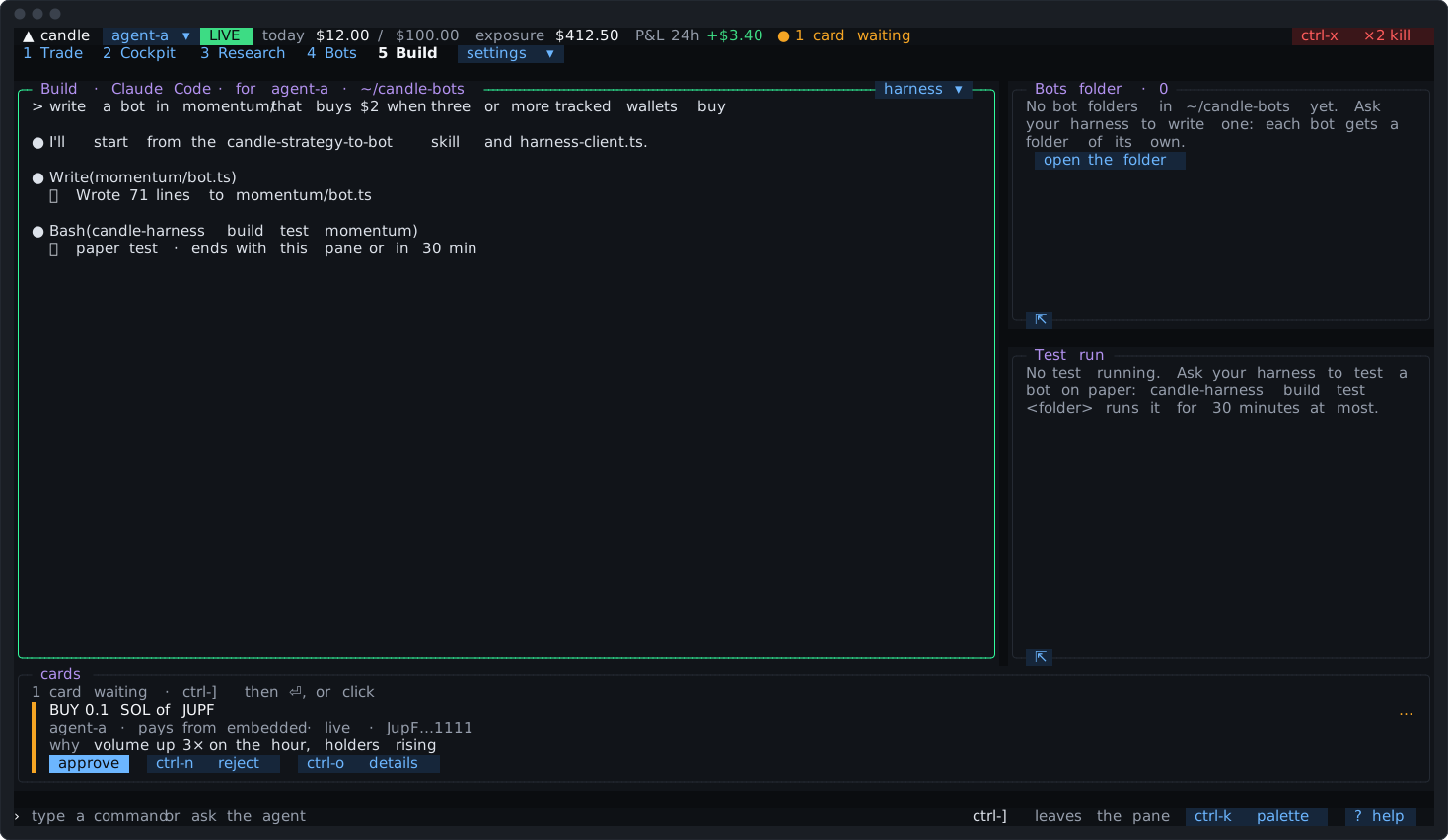
The Build tab runs your own coding harness inside the Candle Harness: Claude Code, Codex, Grok, OpenCode, Pi, or any terminal program of yours. It’s the harness you already use, unmodified and signed in as you, in a terminal pane opened in your bots folder. You ask it for a bot in your own words, it writes the code, tests it on paper, and proposes it. Your press on its card is what makes it a bot; the Candle Harness then runs it and holds its trades to the figures you approved (Code bots).
It’s one of the five tabs a fresh install shows. It isn’t the trading agent: the agent in the agent pane trades and researches with you; the Build tab’s harness writes code, and isn’t given a way to trade.
The first open
Section titled “The first open”The first time you open the tab, the pane asks two things on one screen:
- Where should your bots live?
~/candle-botsunless you type another folder. Each bot is a folder in it, so your editor, git and backups find your code where you’d look. It can’t be/, your home or a folder holding it, or one of the Candle Harness’s own folders (settings, state and the agents’ research folders), wherever a link points. - Which coding harness? Each one the Candle Harness found on this machine, with its version and whether it’s signed in, and “another command…” for anything else, typed as you’d type it in a terminal (it’s split into words, never run through a shell).
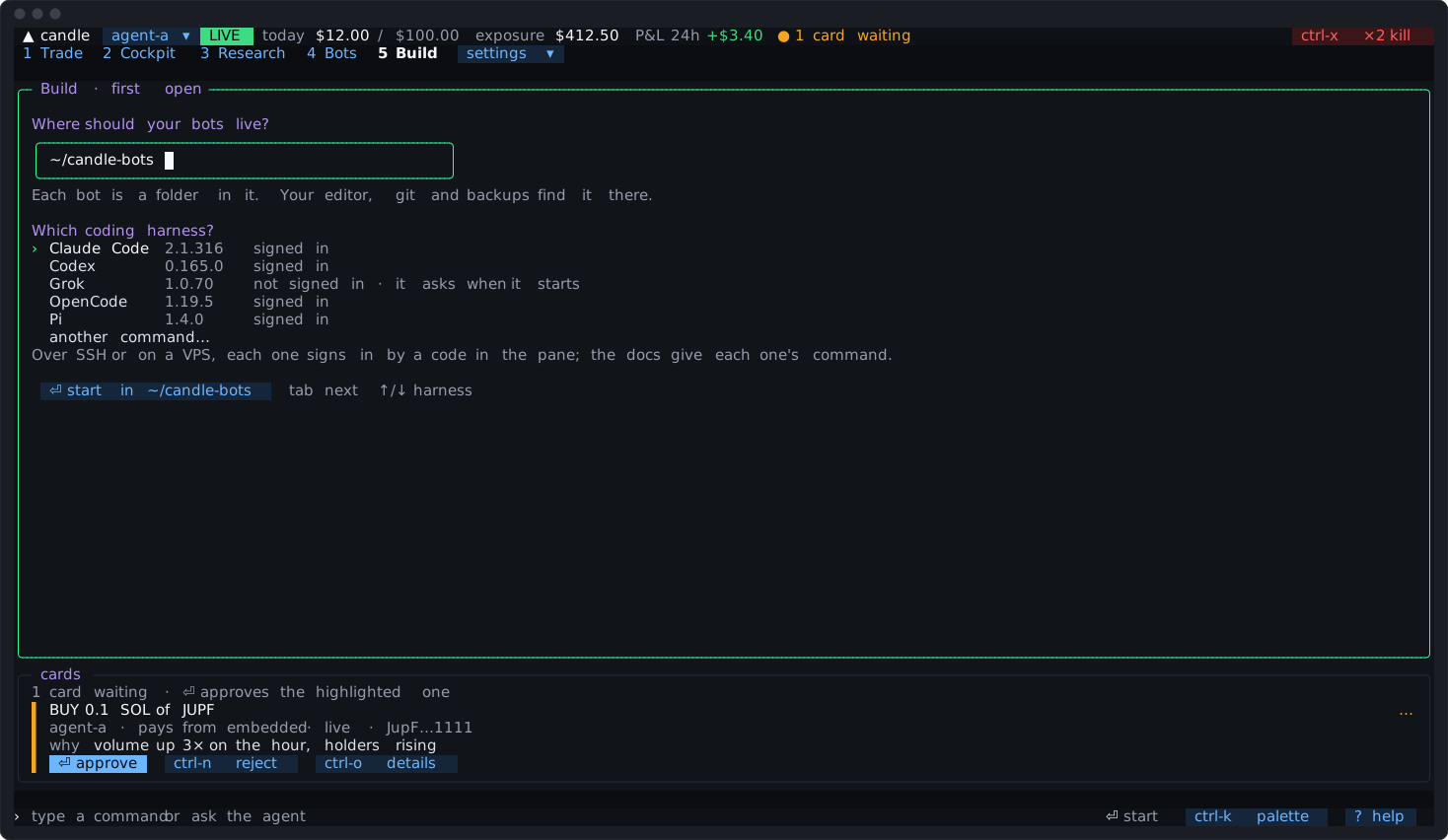
Then it writes the folder and lists every file with what it’s for, and ⏎ start <harness> starts it there; “Starting …” shows until the harness draws, which can take a few seconds. Both choices are kept; [build] folder and [build] harness in config.toml say where a fresh install starts (Configuration). harness ▾ on the pane’s border picks again (exit the harness first).
What the bots folder holds
Section titled “What the bots folder holds”The Candle Harness writes these into the folder, and candle-harness bots init [folder] writes them from a terminal:
| File | What it’s for |
|---|---|
AGENTS.md | What your harness reads first: the rules every bot runs under, how a bot trades through the client (and that it looks a token up rather than writing its mint from memory), the candle-harness build commands, and where each of Candle’s skills assumes something the Candle Harness does another way |
CLAUDE.md | @AGENTS.md, since Claude Code reads only CLAUDE.md where there is one |
harness-client.ts | The client a bot trades through: one file, no dependencies, for Bun or Node 20 and later (The bot protocol) |
.gitignore | Keeps each bot’s token file and node_modules out of git |
.claude/skills/, .agents/skills/ | Nine of Candle’s bot-building skills, unchanged, with Candle’s licence, where coding harnesses read a project’s skills |
Claude Code reads CLAUDE.md and .claude/skills/; Codex and Pi read AGENTS.md and .agents/skills/; Grok and OpenCode read both.
A file you change is never written over. The Candle Harness keeps a hash of each file as it last wrote it; when it updates the folder, it changes only files still as it wrote them, and names each one it kept as yours. A file that was there before is kept the same way, and nothing is written through a link.
Your harness, as you
Section titled “Your harness, as you”The harness runs as it would in any terminal of yours: your sign-in, your skills, plugins, MCP servers and instructions. The Candle Harness leaves out of its environment Candle’s own sign-in variables (CANDLE_API_KEY, CANDLE_AGENT_API_KEY, CANDLE_DEVICE_TOKEN, CANDLE_KEYRING_PASSPHRASE, CANDLE_PROFILE) and its own, and adds the pane’s socket and build token, nothing else.
What that means: your coding harness is a program you run, trusted like any program you run as yourself. It can read what you can read on this machine, your agents’ key files included. The Candle Harness hands it no key, and its pane’s token trades only through a bot you approve on a card. That isn’t no way to trade: as you, it can read your view token and agents’ key files, and a harness that runs candle-harness ask or view acts as you would. So in a Build pane, ask, trigger and attaching as a view are refused, build logs and build journal print what bots and agents wrote fenced as untrusted data, and the folder’s AGENTS.md tells the harness never to run ask or trigger nor read state/. That guards against a cooperative harness going wrong or being steered by text it reads, not against hostile code. Only Candle’s caps on a key hold a program that reads the key file itself (Limits).
Signing in. Each harness signs in by its own command. Over SSH or on a VPS, where no browser opens, each gives a link and a code to type in a browser elsewhere:
| Harness | Sign-in |
|---|---|
| Claude Code | claude auth login |
| Codex | codex login --device-auth |
| Grok | grok login |
| OpenCode | opencode auth login |
| Pi | /login inside Pi |
In the pane
Section titled “In the pane”- Every key is the harness’s while the pane has focus, but two.
ctrl-]leaves the pane (back to the last pane you were in), and a click goes back in.ctrl-xtwice is still the kill switch: the first press goes to the harness, and a second within a second pauses and isn’t passed on. - Cards wait while you type here. With the keys in the pane,
⏎is the harness’s, so the cards’ heading says “ctrl-] then ⏎, or click”, and a card’s chip readsapprovewithout the⏎. - Its border names the agent its bots are built for: “Build · Claude Code · for agent-a”. That’s the agent active when the harness started; make another agent active and the next start builds for that one.
- It keeps running when you switch tabs, with what it showed. Its scrollback holds 5,000 lines, and you can select from it and copy with a right-click (ctrl-c is the harness’s).
- When it exits, the pane says “it exited · ⏎ starts it again”.
- A daemon a harness leaves behind (Codex leaves its app-server running) is listed under the bots folder with a
stopchip once the harness exits. The Candle Harness never stops one unasked.
Beside it
Section titled “Beside it”At full width the harness has most of the tab, with two panes beside it:
- Bots folder: each bot folder and where it stands: a paper test running, a code bot with today’s figure and what it holds, or not proposed yet.
open the folderopens it in your file manager (or says the path over SSH). - Test run: the paper test that’s running: its time left, whether it’s connected,
stop test, the core’s count from its paper fills, what the bot says, and its fills and events by time.
Below 100 columns they fold into one row under the harness, with bots folder ▾ and test run ▾ opening each over the screen.
What your harness can reach
Section titled “What your harness can reach”The pane’s build token reaches the core through candle-harness build, and nothing else:
| Command | What it does |
|---|---|
candle-harness build books [--json] | Every bot’s book and health, rules bots and code bots, every agent’s |
candle-harness build logs <bot> [-n N] | The end of a code bot’s log, for a bot of the pane’s own agent, between <untrusted-data> tags |
candle-harness build journal [--since <when>] [--text <words>] [--limit N] | The agent’s own record: its trades, cards and turns, newest first, as JSON between <untrusted-data> tags |
candle-harness build test <folder> [--per-trade <usd>] [--per-day <usd>] [--max-open <n>] [-- <command…>] | Runs the bot’s code once, on paper |
candle-harness build propose <name> --folder <folder> --mode paper|live --wallet <wallet> --per-trade <usd> --per-day <usd> --max-open <n> [--slippage-bps <n>] [--replace] [-- <command…>] | Puts the bot’s card in front of you |
The token can’t approve anything, trade by itself, or change a limit, key, wallet, trigger or another agent’s bot. What these commands read goes to your harness’s own provider with the rest of what it reads. AGENTS.md tells your harness all of this, so you can just ask: “write a bot in momentum/ that buys $2 when three tracked wallets buy, test it, then propose it on paper”.
The token is made when the pane opens, given to that pane alone, and revoked when the pane closes or the Candle Harness quits. A popped-out view can’t open one.
Testing on paper
Section titled “Testing on paper”candle-harness build test momentum runs the bot’s command (bun run bot.ts where the folder has a bot.ts, else what follows --) in its folder, in your harness’s own terminal, with a test token of its own:
- Paper only, whatever the Candle Harness’s mode. Never live, and never run by the core’s supervisor.
- Held to its own figures: $5 a trade, $25 a day and 3 open unless the command names others, each counted from this test’s start. What an earlier test of the folder left open stays open, and the test can still sell it.
- No Candle key in its environment: the test’s command runs without
CANDLE_API_KEYandCANDLE_AGENT_API_KEY, even where your harness’s own tools set one. - Exits the core holds on its paper buys sell while it runs, as a bot’s would.
- Over when its command ends, when the pane closes,
stop test, or after 30 minutes, whichever comes first. Its token is revoked then. Anything it still holds stays open in its agent’s paper book, said as the test’s and counted as no bot’s. A test needn’t run to its end: once it has connected and traded, stop it and propose the bot. - One test at a time for a folder.
Its output is in the terminal that ran it; the Test run pane shows its paper fills, what it says, and its events.
Proposing a bot
Section titled “Proposing a bot”candle-harness build propose puts a code bot’s card in front of you. A card from the Build pane opens whole over the screen with focus on it:
⏎approves it (after the usual 300 ms);ctrl-nrejects it;Escgoes back to the harness, and the card waits in the strip with your other cards.
If you typed in the harness in the last 2 seconds, the card opens without the keys, so a key meant for the harness can’t approve it. It says “review or ctrl-] · the keys are still your harness’s”: Until then its chip reads approve, with no ⏎ (a click on it still approves). ctrl-] or a click on review takes the card; its chip then reads ⏎ approve, and the usual 300 ms holds.
One card is open for a bot’s name at a time: proposing it again with other settings withdraws the earlier card. An agent’s Build panes can have five cards open between them.
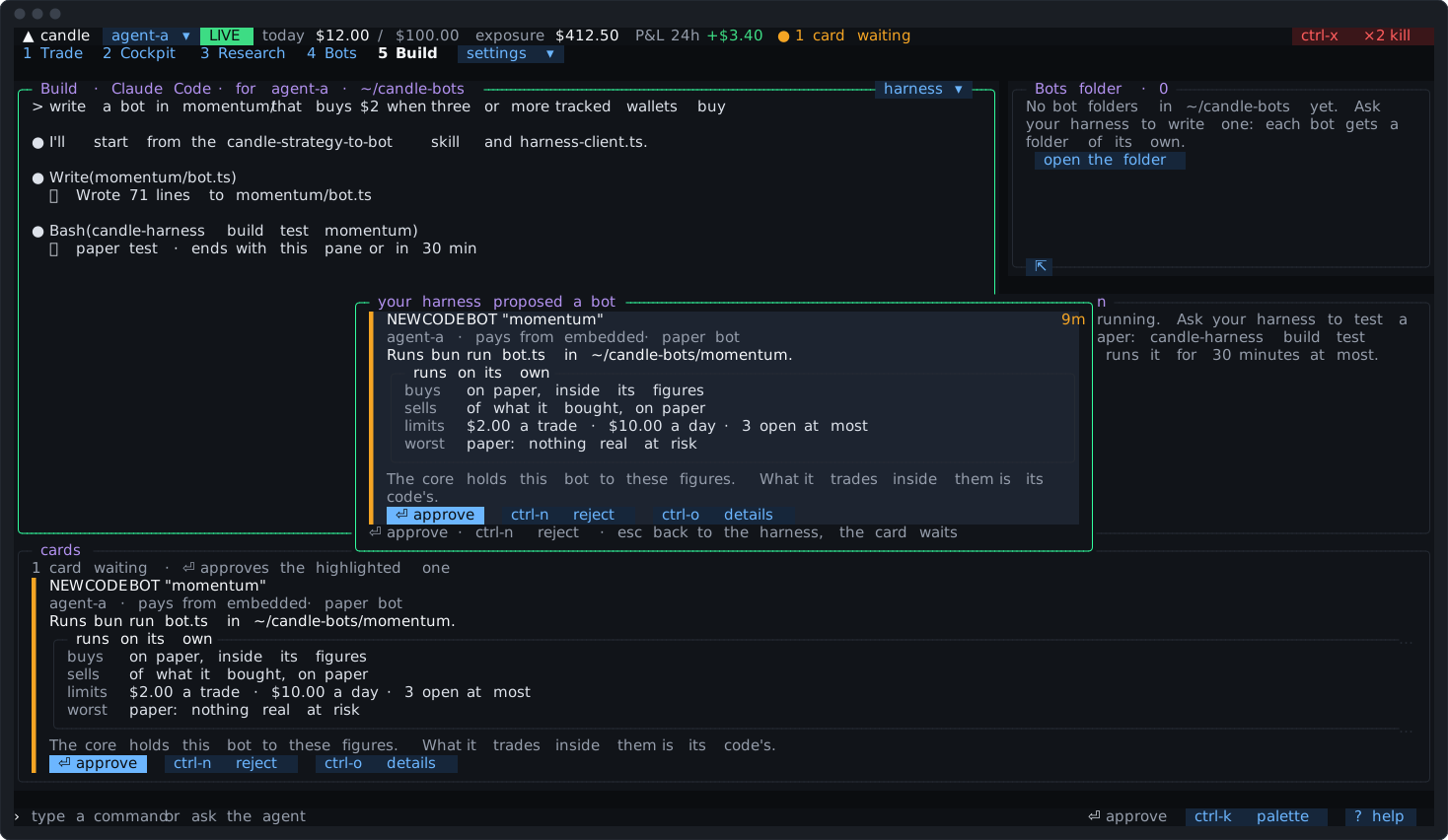
The card shows what you’re approving: its folder and command, its agent and the wallet it pays from, paper or live, its figures and its slippage bound. Code bots says what each one means. Your harness should ask you whether it runs on paper or live, and which wallet pays, before proposing; for a live bot, AGENTS.md tells it to suggest a wallet of its own.
On Free
Section titled “On Free”The harness and the bots folder work on every plan. Testing and running a bot need Pro or Max, as triggers and rules bots do: on Free the Build tab says so, with a chip that types candle plan buy, and build test and build propose are refused (Your Candle plan).
What candle-harness doctor says
Section titled “What candle-harness doctor says”Under build, the doctor names your bots folder and whether the Candle Harness’s files there are up to date (candle-harness bots init adds what’s missing and updates only what you haven’t changed), the files you changed, kept as yours, and each coding harness the Build tab can open, with its version, and which one it opens, warning if that one isn’t installed. Under tools, it says whether this machine can hold the code runner, and for which agents it’s on. Troubleshooting has the fixes.