
The screen
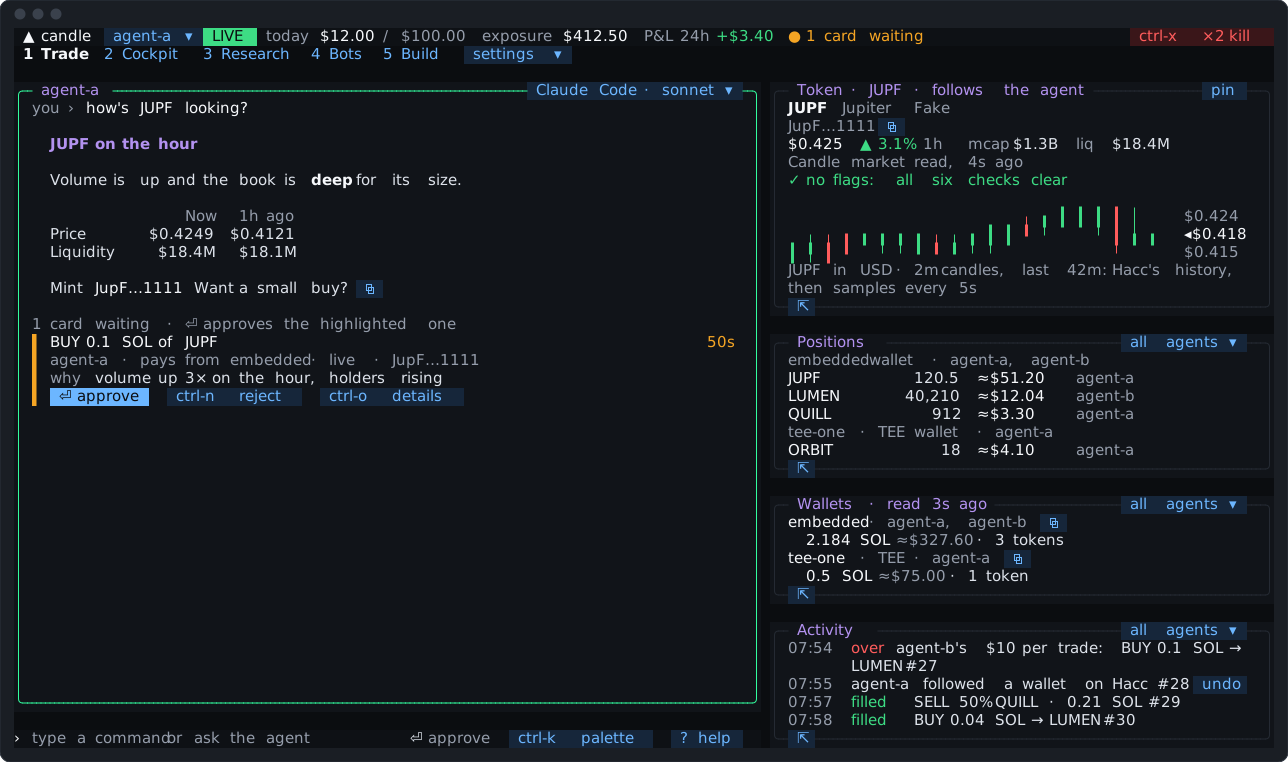
From the top down:
- The status bar.
- The tab bar, with
settings ▾after the tabs. - The panes of the tab you’re on.
- The input line, with the hint line beside it.
The status bar
Section titled “The status bar”Along the top, from the left:
- The active agent, with
▾to pick another. Your messages and typed trades go to it. - PAPER or LIVE. Click it to switch. Going live asks first.
- Today’s spend against the agent’s day limit, and its exposure: what its positions are worth.
- P&L, named by its window:
P&L 24h +$3.40, orP&L since 09:14where the Candle Harness’s record starts later. The P&L tab says how the window works.
Exposure and P&L are always your live books. In paper mode they’re labelled live exposure and live P&L; paper’s own P&L is on the P&L tab.
- How many cards are waiting.
⚡ 4 triggers, while any trigger is on. Click it for the Triggers overlay (Triggers).3 bots, while any rules bot or code bot is running. Click it for the Bots tab (Rules bots, Code bots).- The kill switch,
ctrl-x ×2 kill, in the right-hand corner. While it’s on, that corner saysPAUSEDandresume.
Each tab shows a saved layout of panes. Click a tab, or, with the tab bar focused, press its digit: tab moves focus there, and the hint line then says “1-9 a tab”. On the input line a digit types, as you’d expect. The palette (ctrl-k) goes to any tab too.
A fresh install shows five tabs: Trade, Cockpit, Research, Bots and Build. Five more, Trending, Signals, P&L, Journal and Perps, are one tick away. The tabs describes each. settings ▾ ticks each one on or off, and on a narrow terminal the tab names shrink to a digit and three letters, then a digit, before settings ▾ is ever cut.
Panes and focus
Section titled “Panes and focus”tab moves focus to the next pane, and the arrow keys move to the nearest pane in that direction. The focused pane’s border is drawn in the focus colour: Candle’s mint, in Candle dark.
In a list (Positions, Feed, Signals, Activity, Candle’s lists), ↑ and ↓ move a highlight. The highlighted row’s token becomes the linked token once it has rested for a moment, and the token pane follows it. A click on a row picks it at once. Linked panes says more.
Every pane scrolls, with PgUp and PgDn or the mouse wheel. The wheel scrolls the pane under the pointer. A pane’s bottom border says what’s out of view: ↓ 8 more, or ↓ 12 newer in Activity.
Empty panes say what they’ll show. Before its first read, a pane says what it’s waiting for; when a read fails, it says why, in words.
Small terminals. Below a layout’s width, the tab collapses to the agent and one pane, with a chip to switch which pane it shows. Research opens on Check when collapsed, so it doesn’t look like the Cockpit. On a terminal too small to draw at all, the Candle Harness says the size it needs and how many cards wait. There ctrl-x twice still kills and ctrl-c twice still quits; every other key, ⏎ and pastes included, does nothing until the screen is back, and a card then waits its usual 300 ms again.
The Build tab’s pane is a terminal. While it has focus, every key goes to your coding harness there, the digits and esc included. ctrl-] leaves it for the pane you were in before, and a click goes back in. ctrl-x twice is still the kill switch there. Cards wait while the pane has the keys: ctrl-] then ⏎, or a click (The Build tab).
Chips on the borders
Section titled “Chips on the borders”Small controls drawn as chips sit on pane borders and in lines. Anything drawn as a chip can be clicked:
all agents ▾shows positions, wallets and activity for every agent, or the active one only.ctrl-fdoes the same.pinholds a tab’s token pane on its token.⇱pops the pane out into a split of its own.⧉copies an address in full.
The input line
Section titled “The input line”Type and press ⏎. A line that’s a command runs as your own request: a trade, paper, kill, candle keys list. Anything else goes to the agent, whole. Typed commands lists every command.
The hint line, beside the input line, says what ⏎ and esc do right now: ⏎ approve with a card waiting and the line empty, ⏎ approves in a moment for a card that arrived while you were reading another (it waits 1.5 seconds), ⏎ to agent-a with a message typed, esc stop agent-a's turn while it’s answering.
escwith the line empty stops the agent’s turn. A message you’ve typed meanwhile runs next.esctwice clears a typed line. So doesctrl-u.←and→,homeandend, andctrl-aandctrl-emove along the line.
The palette
Section titled “The palette”ctrl-k, from anywhere, opens the palette. It lists every action, tab, layout, pane, agent, preset, memory, token, alias, theme and Candle command, and typing searches them all. A pick does just what its key or click would. Paste a token’s address into it, Solana or 0x…, and its one row opens that token in the token pane.
The palette never approves a card and never quits, so a stray ⏎ there is safe.
? with the input line empty lists what you can type and every key. From there, c opens the palette at Candle’s commands. Keys is the same list.
The mouse and copying
Section titled “The mouse and copying”Tabs, chips, cards and rows take clicks. A dragged pane border resizes it.
⧉beside an address copies it in full. Addresses in the agent’s replies are shown short, each with its own⧉.- Each of the agent’s answers ends with a
⧉that copies all of it, as written. - Text you select with the mouse copies with
ctrl-c. A selection stays where it is on the screen, so scrolling a pane clears it.
settings ▾
Section titled “settings ▾”Everything you set up once is under settings ▾, beside the tabs. Click it, or open it from the keyboard: ctrl-k, then settings, or type the setting you want.
- which tabs show, and each tab’s layout;
- the theme;
- your agent’s preset, model and memory;
- your own skill folders;
- aliases;
- the P&L window;
- approvals: each wallet asking every time, or trading inside limits;
- triggers: each one’s line and how it runs, switched off or on, removed, or its expired card run again;
- bots: each rules bot and code bot, paused, put back on, stopped, flattened or removed;
- the vault.
Quitting
Section titled “Quitting”ctrl-c twice quits. Once clears the line, closes what’s open, or copies text selected with the mouse.
Quitting the view doesn’t stop a turn that’s running, or a wallet you’ve let trade inside limits: the core finishes the turn, and exits a minute after nothing needs it: no view attached, no turn running, no trade in flight, no card waiting, no trigger on and no bot running. With triggers or bots on, quitting says so, and candle-harness stop ends the core (Triggers). The next time you open the Candle Harness, While you were away says what happened.
Keys you’ll use most
Section titled “Keys you’ll use most”| Key | What it does |
|---|---|
⏎ | Send the line; with the line empty, approve the highlighted card |
ctrl-n | Reject the highlighted card |
ctrl-o | A card’s details |
esc | Stop the agent’s turn (with the line empty) |
ctrl-k | The palette |
ctrl-g | The agent’s preset, engine and model |
ctrl-t | Ask the agent about the highlighted row |
ctrl-x twice | The kill switch |
ctrl-] | Leave the Build tab’s terminal pane |
? | Help |
ctrl-c twice | Quit |
Every key is on the Keys page.