
Triggers
A trigger is “when this happens, do that”: a price, a market cap, a signal on Hacc, a time, a fill. The Candle Harness runs it itself, with no model and no turn, so it fires in seconds, does the same thing every time, and keeps going with the Candle Harness’s window closed.
Your agent still acts only when you message it. A trigger is how you ask for something later: “sell half my JUP if it drops below $0.40”, “buy $5 of JUP every morning”, “tell me when a confluence signal shows under 500k”.
Triggers need a Pro or Max plan. On Free, the Triggers overlay and pane say so, with a chip that types candle plan buy, and nothing is read or fired. If your plan ends, every trigger is kept as it is and held, each saying why. They come back on as they were when the plan returns.
Setting one up
Section titled “Setting one up”Ask the agent, in your own words, or start a line with when, every, at or on. Either way it goes to the agent, which:
- asks for what your words leave open: which token (by its mint), the level and what it’s measured against, how much, which wallet pays, and once or again;
- proposes the exact trigger as a card. The card shows the line, the trigger in words, the agent and the wallet that pays, and how it will run.
Your press on the card saves it. Nothing is saved before, and ctrl-n rejects it.
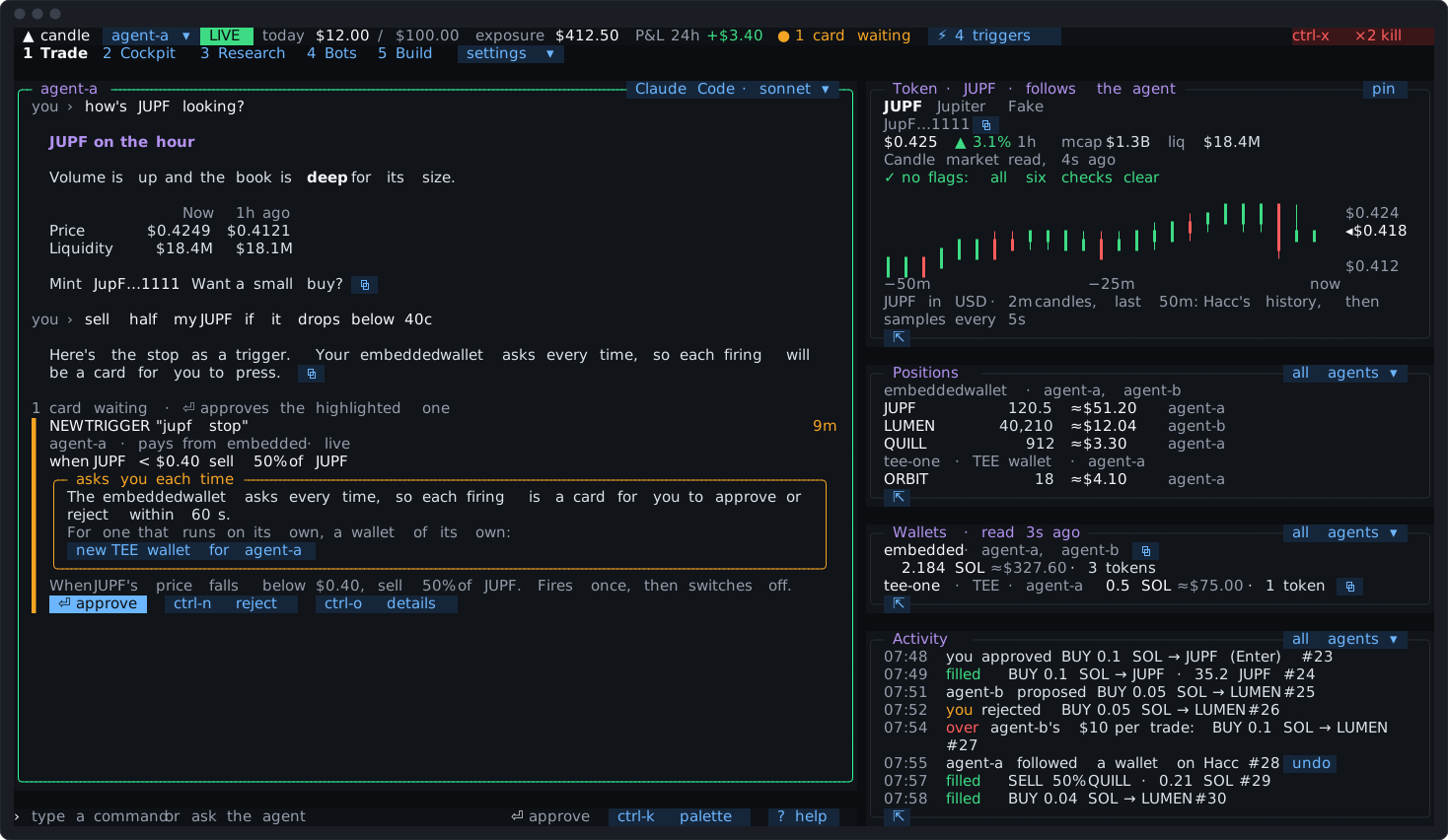
How it runs: on its own, or asking you
Section titled “How it runs: on its own, or asking you”The card’s box says which, before you press:
- Runs on its own. Its wallet trades inside limits, and the trade fits that wallet’s figures. Each firing trades and shows a receipt, with nobody pressing anything. On such a wallet, a sell always fits.
- Asks you each time, in amber. Its wallet asks every time, or the buy is over its figure, so each firing is a card you have 60 seconds to approve. That suits a trigger that watches for chances and leaves the call to you.
For one that asks, the card suggests a wallet of its own: a new TEE wallet just for that trigger, set to trade inside limits. Its chip types the first step. The Candle Harness never changes an existing wallet’s setting for you: that’s yours, in settings ▾ → approvals (Limits).
A trigger’s trades go through the same rules as everything else: the wallet’s figures, the agent’s own limits, Candle’s caps on the key, and the kill switch. Settings that make your typed trades instant don’t apply: a trigger never counts as you typing.
What a trigger can watch
Section titled “What a trigger can watch”| Example | Fires when | |
|---|---|---|
| A price | when JUP < $0.40 | the token’s price crosses the level |
| A market cap | when JUP mcap < 500k | its market cap crosses the level |
| What you paid | when JUP down 20%, when JUP up 50% | the price is that far from your entry on the trigger’s wallet |
| Your P&L | when pnl today < -$20 | your P&L over the trigger’s own window crosses it: today, 24h, session or a time of day such as 18:00 |
| Hacc’s tape | when confluence mcap < 500k age < 60m | a signal of that pattern arrives, within its filters |
| Your own signals | when mine, when mine "whales" | one of your Hacc rules fires |
| A schedule | every day 09:00, every weekday 09:00, every monday 09:00, every 4h | the time comes, in this machine’s local time |
| A time, once | at 14:30 | the next 14:30 on this machine’s clock: today if it’s still ahead, else tomorrow |
| An event | on fill, on fill of JUP, on card expired, on replay ended | it happens in the Candle Harness |
| A bot | on bot "conf" entered, on bot "conf" exited, on bot "conf" paused | the rules bot or code bot buys into a position, sells out of one, or is paused |
| A code bot’s word | on bot "momentum" says "needs-a-look" | the code bot says that word; its line reaches a woken turn as data |
| A call from outside | on call | you run candle-harness trigger <name> |
A P&L trigger keeps its own window. Left out, it takes the window the P&L tab showed when it was proposed, written into its line, so changing the tab’s window later doesn’t move it. Its words say how the figure moves at the window’s edge: today starts again at midnight, and 24h also moves as older results pass out of it. A P&L trigger saved before this follows the tab’s window until you have it proposed again, and its row says so.
Hacc’s patterns are confluence, deployer, large_move, dormancy, intra_book, new_ticker, distribution and kol_mention. Their filters are mcap, age, group <name>, and chain solana or chain hood.
What it does
Section titled “What it does”- A trade, sell or swap, as you’d type it:
sell 50% of JUP,buy $5 of JUP,swap 0.5 sol usdc. A chain of them with;runs one part after another, each once the one before has filled. An alias of yours works too, and the trigger keeps what it meant when you approved it. notify, ornotify "<words>": tells you, and does nothing else.wake <agent>, orwake <agent> "<what to look at>": starts a turn for the agent, for when deciding needs judgment. See Waking an agent.
In a tape trigger, or one on your own signals, it is the token that fired: when new_ticker mcap < 200k buy $2 of it.
A trigger never runs a candle command, an owner step or a transfer out.
Paper and live
Section titled “Paper and live”A trigger is paper or live, as you approved it. Its card says which, triggers.toml keeps it as mode, and it fires in that mode whatever the Candle Harness’s own mode is then. So switching to paper doesn’t turn a live stop into a paper trade, and a live stop keeps watching. The switch says how many triggers stay as approved (“1 live trigger stays as approved: its trades are still real”).
Taking a paper trigger live, or a live one to paper, is a new card. A trigger saved before modes were kept runs in the mode it was approved in.
Once or again
Section titled “Once or again”- A level fires once, then switches off. End the line with
againand it re-arms each time the level is crossed back. - The tape and your signals fire once per token in each cooldown.
- Schedules and events fire each time.
at 14:30runs once, then switches off. cooldown 2hsets the wait between firings, from a minute to 30 days. It’s 30 minutes unless the line says otherwise.as "<name>"names it. Without one, it goes by its condition’s words.
A stop as a trigger, once: when JUP < $0.40 sell 50% of JUP. A take-profit ladder: when JUP up 50% sell 25% of JUP again cooldown 1h.
How quickly it fires
Section titled “How quickly it fires”- A level is checked about every 5 seconds against Candle’s own market price, the one a sell fills at. A stop isn’t guaranteed: a fast move can pass through the level before the trade is sent, and the trade fills at the price then. It isn’t an order held on Candle’s side.
- Hacc’s tape arrives as Hacc sends it. A signal from before the trigger was switched on is never acted on, nor one heard more than 10 minutes after it happened, such as while the core was catching up after a gap. Those are said as missed.
- A schedule missed while the machine slept runs once, late, if it wakes within the hour (or within the schedule’s own interval, if shorter). Later than that, it’s said as missed, and the next run is set. An interval that slept through several runs runs its latest one, and says the ones before it as missed. An
attime missed by more than an hour is said as missed and switches off. - Schedules run on this machine’s clock. The agent is told the time here and the zone at the start of every turn, so “at 9 tonight” means 21:00 where you are.
- Nothing fires twice. A firing is recorded before it runs, so a restart mid-firing doesn’t repeat it.
Cards nobody is there to press
Section titled “Cards nobody is there to press”A firing that asks you is a card, and a notification while the Candle Harness’s window isn’t in front (Notifications). It waits 60 seconds, like any card. If nobody presses it, it expires and nothing is sent.
The Triggers overlay then offers run it now (ctrl-r) on that trigger: it proposes the same trade again, once, at a fresh price, for you to press.
Waking an agent
Section titled “Waking an agent”wake starts a turn for the agent with what woke it: the trigger, the signal or level, and the token’s full address, marked as data, then your own words on the trigger. It’s marked ⚡ woke in the agent’s pane, Activity and the Journal, so you can tell it from a turn you started.
- Its trades run as yours would: inside the wallet’s figures with a receipt, over them a card.
- It can’t start a transfer out. Only your own message can ask for one.
- It can read your triggers and switch off its own agent’s, and nothing more. Another agent’s stay on: it says why it would switch one off, and that’s yours to do. Changing one is for you to ask.
- Each agent is woken at most 4 times an hour and 24 times a day. A wake past either is skipped and said. Wakes that come while the agent is busy join one woken turn, which counts once.
[agents.<name>.wake]in config.toml changes the caps:perHourandperDay, where 0 means triggers never wake it (Configuration).
A woken turn costs what any turn costs on your engine. Use notify where you only need to know, and a trade where the action is fixed.
The Triggers overlay
Section titled “The Triggers overlay”From settings ▾ → triggers, the palette (ctrl-k), or the status bar’s ⚡ 4 triggers chip. A layout of your own can also hold a Triggers pane.
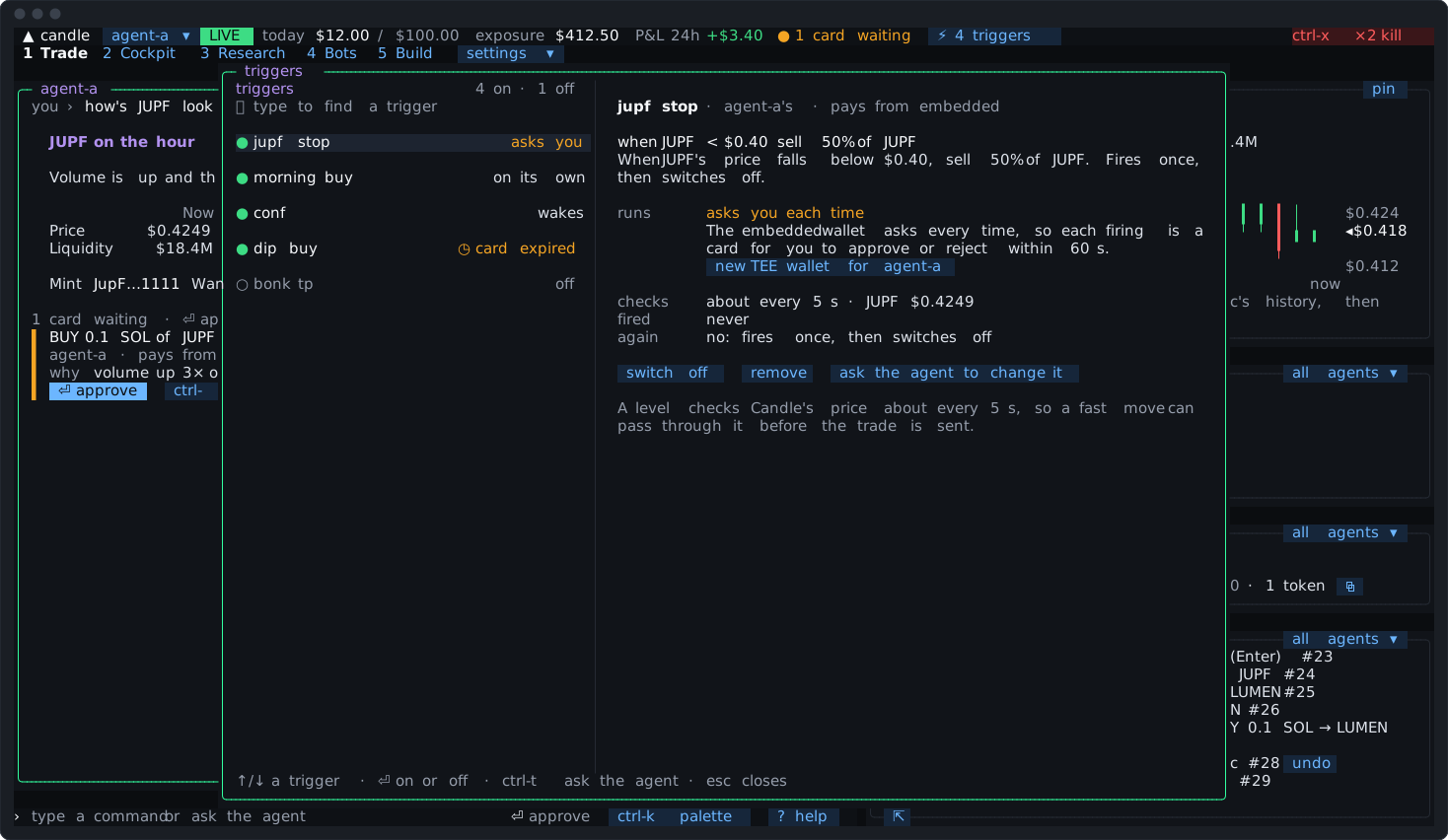
Each trigger on the left says how it runs: on its own, asks you, notifies, wakes, off, or ◷ card expired. The picked one, on the right, has its line and its words, its agent and wallet, what it checks and how often, when it last fired and its next run, and whether it fires again.
⏎switches it off, or back on as you approved it. Switching one back on is only from the main window.removetakes it out, asking once.ctrl-rruns its expired card again.ctrl-tputs “change the trigger …” on the input line, for the agent. A narrower change (a smaller amount, a level harder to reach, a longer cooldown) to one of that agent’s own triggers is made at once; for a trigger that sells, a smaller amount or a level harder to reach protects less and is a card. Anything wider, or any change to another agent’s, is a new card.- Typing finds a trigger by name.
A trigger that isn’t watching says so. If its line can’t be read just now (a wallet it names can’t be found, say), the overlay shows “It isn’t watching now” with the reason. It fires nothing meanwhile, and watches again by itself once the line reads. After a minute the Journal has it, and the note when you come back lists it.
On a Mac, the overlay also holds keep-awake (Kept running).
When it fires
Section titled “When it fires”A firing is one line in the agent’s pane and in Activity, updated as its trade goes: what fired it, then what it did, and how that ended.
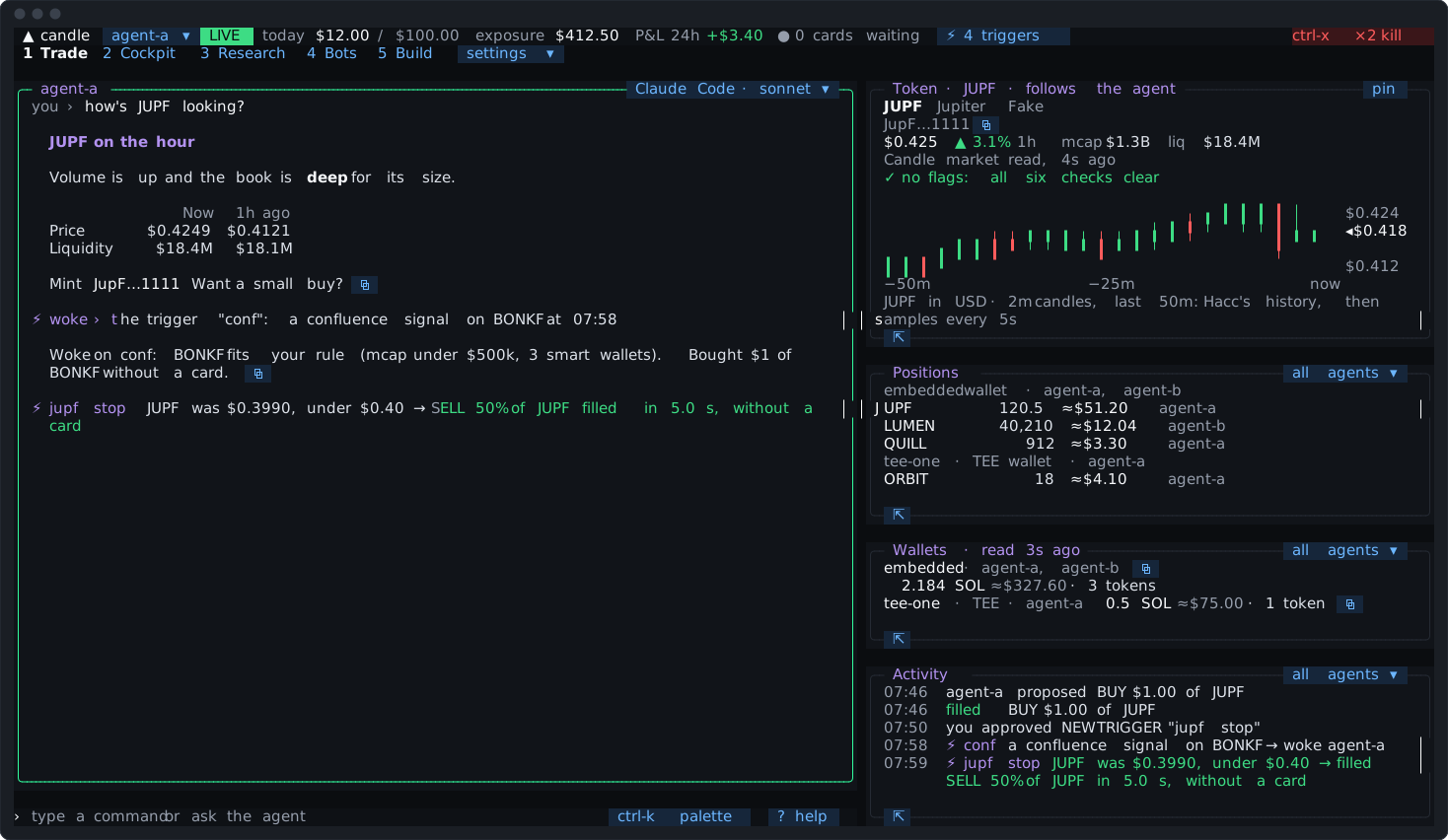
Every card, receipt and row a trigger causes names the trigger, so nothing it did reads as yours. The note when you come back has a Triggers section: what fired, what waited for you, what was held and what was missed (While you were away).
The kill switch and triggers
Section titled “The kill switch and triggers”ctrl-x twice holds every trigger’s buys and swaps, and its wakes, until you resume. Its sells still go: a stop still gets you out. The kill report names each trigger it holds.
To switch triggers off, ask the agent (“stop all my triggers”), or use the overlay. In a turn you started, the agent can switch off any trigger, another agent’s included; in a turn a trigger woke, only its own agent’s. It never switches one back on: only you do. When an agent switches off a trigger that sells, such as a stop, you’re notified, and Activity and the Journal say its sell no longer waits.
triggers.toml
Section titled “triggers.toml”Triggers are kept in triggers.toml beside config.toml, written by the Candle Harness when you approve, switch or remove one. Each keeps the line you saw on its card and what it meant when you approved it.
An edit by hand can’t add a trigger or widen one. Setting on = false switches one off. Any other change holds that trigger until it’s approved again on a card, and the overlay and candle-harness doctor say why. A file the Candle Harness can’t read is never written over: the doctor names the line to fix. Configuration lists its keys.
Kept running
Section titled “Kept running”A trigger that’s on keeps the Candle Harness’s core running after you quit. The status bar says how many are on, and quitting says “3 triggers keep running in the background”. candle-harness stop ends the core, with no question, and says what it stopped.
- To start the core at login, so triggers run with no terminal open:
candle-harness service install. It’s for a machine that stays on, or a VPS (Running on a VPS). - On a Mac, keep-awake keeps it from sleeping while a trigger is on. Switch it in the Triggers overlay or the palette, or set
[core] keepAwake = truein config.toml. A closed lid on battery still sleeps it, and triggers wait for it to wake.
Notifications
Section titled “Notifications”While the Candle Harness’s window isn’t in front, it tells you what happened:
- a card waiting that you didn’t make, such as an agent’s or a trigger’s;
- a trigger doing something: its notice, its trade’s fill or failure, a missed run, a card nobody pressed;
- an agent switching off a trigger that sells;
- a wake skipped at its agent’s cap;
- the kill switch;
- Candle holding a key;
- the core stopping when nobody asked it to.
Things that happen together come as one notification. Addresses show short, and no key is ever in one.
How it reaches you: your computer’s own notification here, the terminal’s own over SSH, else the terminal’s bell. With no Candle Harness window open, the core shows your computer’s own notification itself, on a Mac or a Linux desktop. On a VPS, or over SSH with no window open, nothing reaches you until you reattach.
On a Mac, your computer’s own notifications are filed under Script Editor, which macOS may set to show no banner: they reach Notification Center silently. To see them as they come, set Script Editor to Banners or Alerts in System Settings → Notifications.
[notify] in config.toml sets how (mode: auto, native, osc, bell or off) and what (on: cards, triggers, bots, wakes, kill, keys and core). candle-harness doctor says what this machine can send, with a window open and with none.
From outside the Candle Harness
Section titled “From outside the Candle Harness”From a script or another terminal, as the same user, while a core runs:
candle-harness ask "<words>"sends an agent your message, as if typed in the Candle Harness, and prints its reply.--agent <name>picks the agent, and--no-waitreturns at once. A card it proposes still waits for your press in the Candle Harness, and it says so. The conversation, Activity and the Journal mark it “from outside”.--jsonprints one object instead: the agent, the turn, how it ended, the reply, and each card the turn caused with where it stands.candle-harness trigger <name>fires anon calltrigger, with its cooldown, its wallet’s figures and the kill switch, and prints what it did.candle-harness cardslists the cards the core holds, newest last, and how each ended, so a script that sent a message can find out what became of the card it left waiting.--waitwaits until no card is waiting or running (or, with a card’s id, until that one ended),--jsonprints one object, and--alllists every card rather than the newest 20 and any still open. It only reads: nothing here approves a card. The press stays in the Candle Harness.
None of them starts a core, and none counts as your open Candle Harness. Each exits with a code a script can read: 0 done, 1 it ran and didn’t end well (for cards, the core went away while it waited), 2 a usage mistake, 3 no core running, 4 refused with nothing run, and 5 a trigger still cooling down.
Going further
Section titled “Going further”- A strategy that keeps entering and exiting on its own (many tokens off Hacc’s tape, each with the same stake and the same exits, and a book of its own) is a rules bot, not a trigger. Logic of your own, in code, is a code bot. A level on a price or market cap stays a trigger. A tape trigger can become a bot: ask the agent.
- The agent’s
harness_triggersreads every trigger, proposes one as a card, narrows one of its own at once, and switches one or all off. candle-harness doctornames each trigger that’s on with what it watches, a level checked slower than it should be, one held and why, the login service, keep-awake and notifications.