
Candle Harness
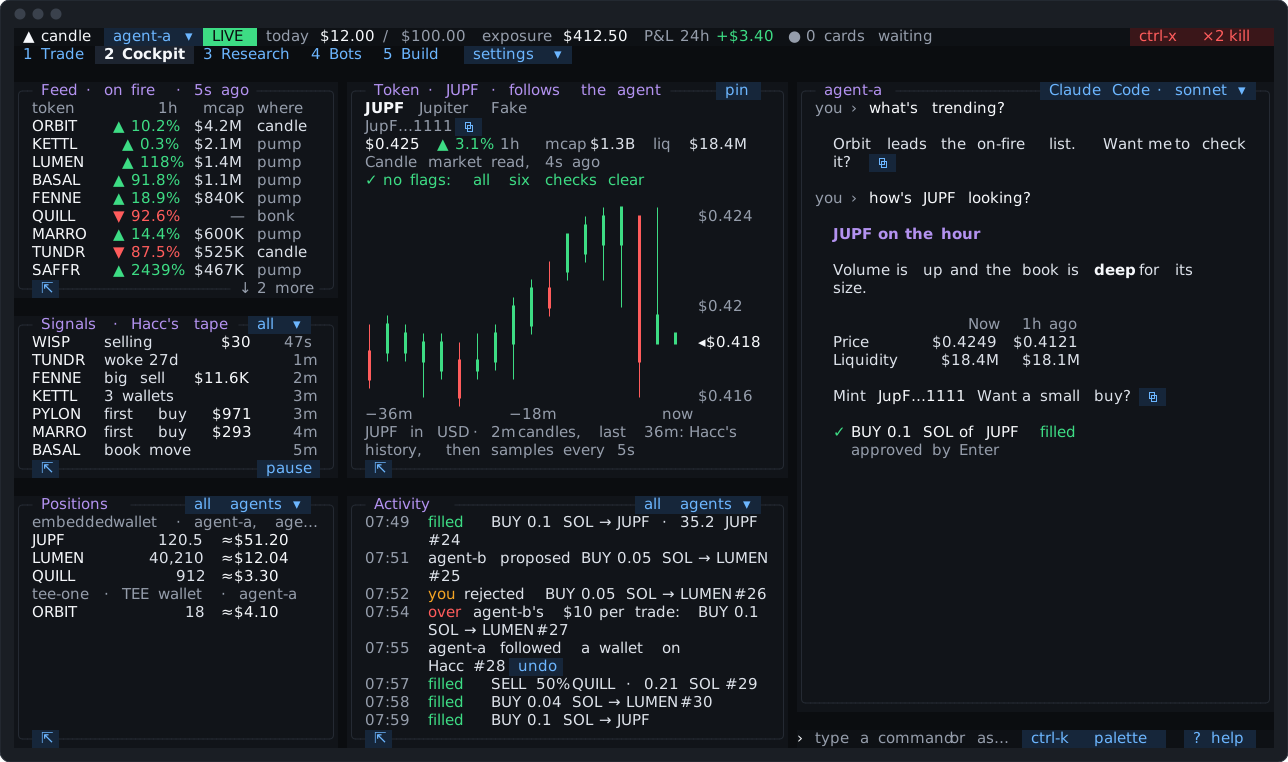
The Candle Harness is a trading terminal for Candle that runs in your terminal, with an AI agent working beside you. The agent reads Candle and its market data for you: the feed, the signal tape, wallets worth watching, token checks, your positions and P&L. It proposes trades, and each one comes to you as a card you approve with one key press.
The agent runs on a coding agent you already use and are signed in to: Claude Code, Codex, Grok, OpenCode or Pi. The Candle Harness ships no model sign-in of its own, and keeps your own setup of that agent out of its turns.
Install
Section titled “Install”On macOS 13 or later, or Linux:
curl -fsSL https://github.com/candledottv/harness/releases/latest/download/install.sh | bashThen run candle-harness. The first run walks you through setup: about 5 minutes with your AI coding tool (Claude Code, Codex, Grok, OpenCode or Pi) already signed in. Getting started goes through it step by step, and Installing says what the installer checks.
How it works
Section titled “How it works”- One small process on your machine, the core, holds your agents’ keys and trades. Every screen and every agent attaches to it. Nothing else the Candle Harness runs holds a key.
- The agent proposes; you approve. A trade, swap, launch or stake the agent proposes is a card, priced fresh and checked against your limits.
⏎approves it. You can also let a wallet trade small amounts inside two figures of its own, with no card; its sells then run with no card whatever their size. - Paper first. The Candle Harness starts on paper: trades are recorded at the quoted price and never sent. Go live when you’re ready.
- The kill switch (
ctrl-xtwice) stops the agent and pauses buys at once. Sells you have open stay one press away. - The agent acts when you message it. For anything later (a stop, a buy every morning, a signal to watch for), it sets up a trigger with you, which the Candle Harness runs itself, with its window open or closed. For a strategy that keeps buying on Hacc’s signals and selling by its own exits, it sets up a rules bot. Pro and Max.
- Build your own bots. The Build tab runs your own coding harness, signed in as you, in a folder of your bots. It writes a code bot, tests it on paper and proposes it; your press on its card starts it. The core runs it and holds every trade it sends through the core to the figures you approved. A code bot and your coding harness are programs you run, trusted as any program you run yourself. Pro and Max.
In this guide
Section titled “In this guide”| Page | What it covers |
|---|---|
| Getting started | Install, setup, a paper trade, going live |
| The screen | Tabs, panes, the palette, the input line and the keys you’ll use most |
| Your agent | What to ask, presets, models, memory, skills and the code runner |
| Trading | Cards, typed trades, paper and live, aliases and chains |
| Wallets | The embedded wallet, TEE wallets, the vault, names and groups |
| Limits | Who holds each limit, and trading inside limits with no card |
| Safety | The kill switch, keys, the prompt pane, funds out, what leaves your machine |
| The tabs | Trade, Cockpit, Research, Bots and Build, and five more a tick away |
| Your Candle plan | What Free, Pro and Max give you in the Candle Harness |
| Make it yours | Layouts, linked panes, token panes side by side, pop-out and themes |
| While you were away | The note that says what happened since you last looked |
| Triggers | When something happens, do something: trades, notifications and waking the agent |
| Rules bots | A Hacc strategy the Candle Harness runs for you: buys on the tape, sells by its exits |
| Code bots | A program of yours that trades through the core, its trades held to the figures you approved |
| The Build tab | Your own coding harness in the Candle Harness, writing, testing and proposing bots |
| Running on a VPS | The Candle Harness on an always-on server, in tmux over SSH |
| Engines | Where Claude Code, Codex, Grok, OpenCode and Pi differ |
| Troubleshooting | The doctor, and the common snags |
| Glossary | The Candle Harness’s words, in one place |
The reference pages list every key, every typed command, every setting and every Candle command. They’re written from the Candle Harness’s own code. For developers, Architecture the attach protocol and the bot protocol describe how it fits together.
The Candle Harness is open source under the MIT license, at candledottv/harness.