
Trading
There are two ways to trade: ask your agent, or type the trade yourself. Either way, a live trade is a card you approve with one key press, unless you’ve let its wallet trade inside limits.
Paper and live
Section titled “Paper and live”- Paper trades are recorded at the quoted price and never sent. They need no funds and no card. The Candle Harness starts on paper.
- Live trades move real funds.
Click PAPER or LIVE in the status bar, or type paper or live. Switching to live asks first, and the question lists what a first live trade would still be missing: a key that isn’t allowed a wallet yet (with a chip that types the line that allows it), no limits set here, or a wallet with no SOL. y still switches. The mode you last picked is kept across restarts.
Triggers and bots keep the mode you approved each with: switching here changes none of them, and the switch says how many triggers stay as approved (Triggers, Rules bots).
Asking the agent
Section titled “Asking the agent”buy $10 of MOON
The agent proposes the trade, and it becomes a card in its pane. The agent can’t approve it.
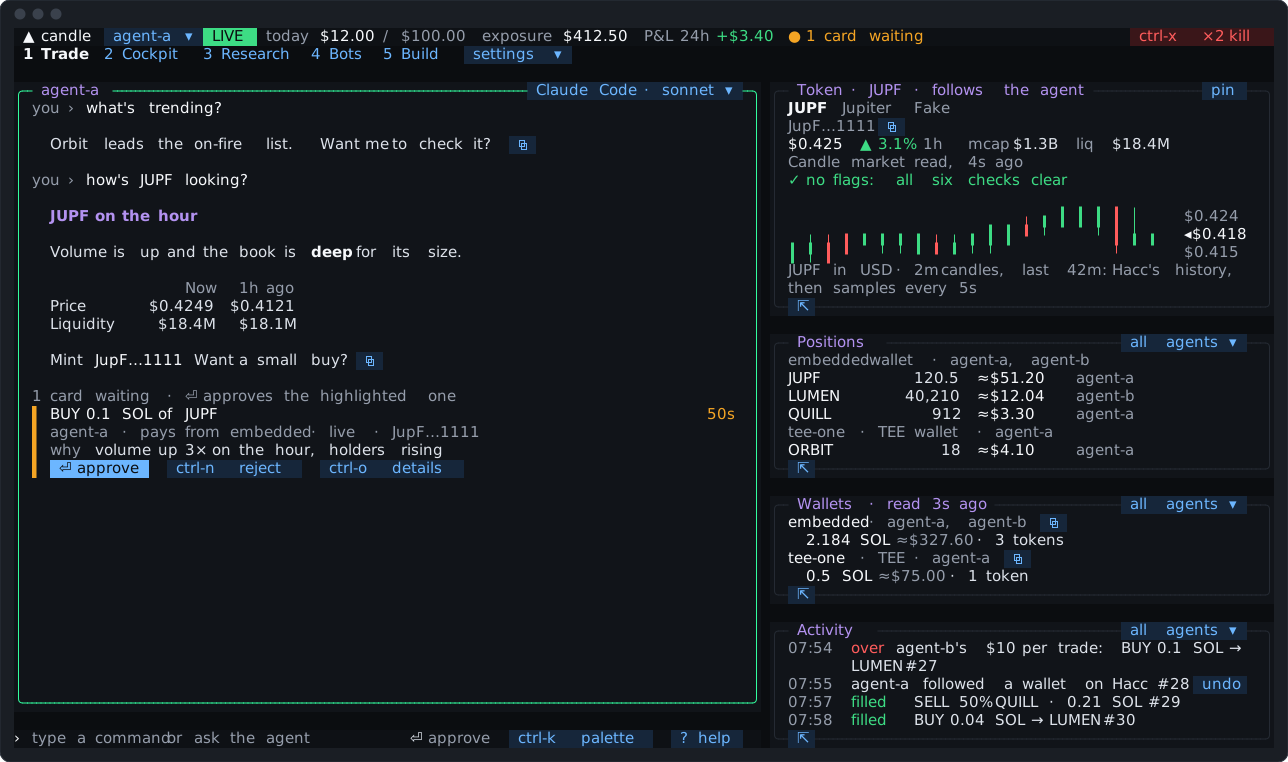
A card is priced fresh when it’s proposed, from Candle’s market read, and checked against the agent’s limits there and then. A trade over a limit is refused, with the figures, and never becomes a card you could approve.
A trade card names its token and, dim beside it, the token’s short address; ctrl-o has the address in full. If the same name is held in one of your wallets, or was on an earlier card, for another token, the card says so in amber. The receipt of a trade that ran without a card shows the same.
Once a card waits, the agent’s turn ends there. It reads how the trade went the next time you message it.
| Key | What it does |
|---|---|
⏎, with the line empty | Approves the highlighted card, once it has shown for 300 ms. A card that arrives while another is open waits 1.5 seconds before ⏎ takes it, and the hint line says ”⏎ approves in a moment” until then, so a press meant for the card you were reading can’t land on a new one |
a click on its ⏎ approve chip | Approves it too. A click elsewhere on the card picks its token |
ctrl-n | Rejects it |
ctrl-o | Shows everything it’s bound to: the amounts, the price, the wallet that pays, the limits it was checked against, and the other wallets it could pay from |
ctrl-r | Re-quotes the newest expired card that can be re-quoted, at the current price |
With two cards waiting, the one ⏎ approves is shaded. A card that isn’t approved expires, which is safe: nothing is sent. A trade, swap, launch or stake card can be re-quoted once expired. A card made from something that may have changed since (a trigger’s, a bot’s, a change to approvals or to Hacc, less access) can’t: it says “expired, never ran: ask for it again”. Candle fills at its own price, within its slippage limit. That’s 1% unless the agent sets another
(0.5% from a TEE wallet, the CLI’s default). When it does, the card says so (“slippage 5%, the default is
1%”), in amber when it’s looser, and so does the receipt of a trade that ran without a card. On a wallet
that trades inside limits, a looser bound makes the trade a card, a sell included.
The card says which wallet pays, and how each card was approved is recorded in the Journal: by ⏎, by a click, or without a card.
Typing a trade
Section titled “Typing a trade”Type a trade in full on the input line:
buy 0.1 sol MOONbuy $25 MOONsell 50% MOONsell 1000 MOONswap 0.1 SOL USDC- Amounts: an amount of SOL, USDC or CNDL; a dollar amount, converted when the card is made into SOL (or the asset in
trade.spendAsset); a percent of what you hold, from 1% to 100%; or an amount of the token. - Swaps are between base assets: SOL, USDC, CNDL, ETH or USDG. SOL, USDC, ETH and USDG can’t be the token of a buy or sell, live or on paper: convert one with a swap.
- The token is its mint, or a name a pane or the agent has shown this session. A name nobody has shown is never guessed: the Candle Harness says so and offers
ctrl-tto ask the agent which token you mean. SOL, USDC, ETH, USDG and CNDL only ever mean the real assets, never a token that calls itself by one of those names. - A line shaped like a trade that can’t run says why, keeps the line for you to fix, and sends nothing. It never quietly becomes a message to the agent.
A typed live trade is a card by default, so you see its price before it goes. With [cards] typedTrades = "instant" in config.toml, a trade you type runs at once, inside the agent’s limits.
… as agent-b runs the line as another agent, and … from <wallet> names the wallet that pays: buy $25 MOON from embedded. Wallets says how a wallet is picked.
A trade Candle didn’t answer
Section titled “A trade Candle didn’t answer”Now and then Candle doesn’t answer a trade in time. The Candle Harness reads it back from Candle under the same id before doing anything else, so a trade is never sent twice. If it still can’t tell, the trade waits in the agent pane:
resendsends it again, after reading it back first. Only the main window can;abandonlets it go.
Or click the trade in the agent pane.
A swap whose first leg went and whose second failed says “part done”, never plainly failed, and its first leg counts toward the day.
A bridge (SOL or USDC to ETH or USDG, or back) rarely fills in the seconds the swap is measured in, so its settlement usually first reads pending. To learn how it settled, the agent reads it again with candle_get_swap_receipt, by the swap’s clientSwapId or any of its hashes, no more than once every 15 seconds. That read moves nothing and never resends the swap. A failed bridge says whether Relay refunded it (bridgeStatus: "refund").
Aliases
Section titled “Aliases”An alias stands for the start of a line. Put them in config.toml:
[aliases]b5 = "buy $5 of"s = "sell 100% of"Then b5 MOON buys $5 of MOON. An alias can’t take a built-in name such as buy, can’t loop, and can’t run more than 5 parts. One that’s left out is named with its line, when the Candle Harness starts and in candle-harness doctor. The palette’s alias rows reload the file.
Chains
Section titled “Chains”A ; chains up to 5 trades or candle commands:
buy $1 of MOON; sell 100% of MOON- Every part is checked before anything is sent. A part that would be refused refuses the whole line, naming its number.
- Then the parts run one after another: each is sent only once the one before has ended. So the sell above is sized from what the buy left you.
- A part that’s rejected, fails or isn’t answered stops the rest, and the message says what was sent.
- A line is a chain only when its first part is a command, so a message to the agent with a semicolon in it still goes to the agent.
Candle’s commands
Section titled “Candle’s commands”candle <command> runs any of Candle’s CLI commands under its rule:
- a read runs at once, and you see the output;
- one that only takes access away (revoking a key, say) runs at once when you type it;
- one that spends or changes something is a card;
- an owner step, or one that asks for a passphrase or shows a secret, runs in the prompt pane.
The agent runs them the same way when you ask it. Candle’s commands in the Candle Harness lists every command with its rule.
Launches, staking, claims, posts
Section titled “Launches, staking, claims, posts”A launch, a stake or unstake, a fee or staking-reward claim, a profile edit, a post, an image upload and a token’s description and links (edited by the account that launched it) are one-press cards, like a trade’s. They’re live only.
- A launch, a stake and a fee claim are dry-run first, and the card shows the preview. A dry run Candle refuses makes no card.
- A launch’s first buy is valued and limited like a buy.
- A launch card shows what the press publishes besides the name: its description, the sites its links and images point to, and, in amber, any terms that aren’t Candle’s defaults.
- A card for one of Candle’s tools is refused if it carries an argument the Candle Harness doesn’t know, so nothing unshown rides on a press.
- A public action (a post, a profile edit, an upload, a token edit) says so on the card. An image upload says it’s public and permanent.
- A launch image goes by its URL. To use a file, upload it first with
image upload, from the agent’s research folder.
On Candle, but not in the Candle Harness yet
Section titled “On Candle, but not in the Candle Harness yet”- Limit and stop orders held by Candle. Candle offers them on Max (Limit and bracket orders). In the Candle Harness, a stop or a take profit is a trigger or a bot’s exit, watched on this machine.
- Telegram alerts. Set them up on Candle (Alerts).
- Perps trading. The Perps tab shows what works for perps today, and what to ask the agent. The tabs has it.
- Writing to a token’s page. Claiming a page, writing its sections, holder updates and comments need a key with token-pages access, which no agent key in the Candle Harness has. Reading a page works. Run the writes with
candle tokenin your own terminal, with a key made for it.
Going further
Section titled “Going further”- Pricing.
[pricing]inconfig.tomlsets where a card’s price comes from. A card is never re-priced on approve. - Trading inside limits. A wallet can run small trades with no card, leaving a receipt instead. Limits explains it.
When a Hood leg is uncertain
Section titled “When a Hood leg is uncertain”If a leg’s receipt is not confirmed the Harness says the leg “may have been broadcast” and does
not repeat the trade. Run the status command it names (for a Hood trade, --kind trade); it reads
the exact transaction and sends nothing. “No leg is confirmed yet” means no receipt has been seen,
not that nothing was sent. A reverted leg says so and notes that network fees may have been charged.
Legacy Hood leg recovery and readable guards
Section titled “Legacy Hood leg recovery and readable guards”A WALLET_BUSY refusal names the guarded operationId, rail (operationKind), client refId,
leg, fixed reason, clearingCondition, statusPath and statusCommand. An operation id is
separate from a rail’s client id:
candle swap status --operation <operationId>candle swap recover --operation <operationId> --hash <0x-transaction-hash>GET /api/v1/agent/hood-tee/operations/{operationId} and
POST /api/v1/agent/hood-tee/operations/{operationId}/recover return
{ success: true, operation: { ..., guard?, recovery? } }. The POST body accepts only
{ candidateHash?: string }. A locator names a transaction to verify; it never proves identity.
Both paths use the account’s owning rail scope (swap:write, launch:read, or transfer:write);
swap operations also require the key that placed them. An unauthorized lookup returns the same
404 JOB_NOT_FOUND as an unknown id. Recovery inside an active window returns 409
OPERATION_ACTIVE, retryable true. Reads and recovery work while the trading switch is off.
Legacy recovery reconstructs the exact signed type-2 envelope and verifies its hash, signer and
historical Candle stamp before recording an exact-hash receipt. It needs no client-held bytes.
It never signs, sends, rebroadcasts, restamps, returns a next leg, collects fees or revives the
operation. Failed/expired parents and unattempted planned legs keep their labels. Proving one
leg keeps every other unresolved leg held. A nonce count, elapsed time, missing transaction,
allowance or terminal job label cannot clear a hold. not_sent requires positive bound claim
proof that signing cannot have happened or happen later; pending/ambiguous claims remain held.
While guard.recoveryRequired is true, read status and follow clearingCondition. CLI status and
recover exit 3 while held. legacy_identity_missing can accept a locator; nonce_conflict,
receipt_conflict, legacy_candidate_conflict and legacy_proof_incomplete keep the wallet held
until the stated proof or a separately reviewed disposition exists. A landed leg stays landed.
No rebuild or repeat-trade instruction follows an uncertain result.
Every Hood rail job read carries its operation’s guard, regardless of the job’s terminal label.
GET /api/v1/agent/wallets/{walletId}/hood-tee is the read-only locator of last resort, even with
no job row: guard: { held, incomplete, operations } lists at most 10 held operations. A held
failed/expired operation also makes activeOperation non-null for installed custody clients.
Incomplete proof without a known holder omits activeOperation, so those clients fail closed.
Current custody commands refuse WALLET_GUARDED. Preserve that compatibility projection during
rollback. This endpoint performs no recovery writes.
SDK: getHoodTeeOperation(operationId) and
recoverHoodTeeOperation(operationId, { candidateHash? }); GuardSummary and WalletBusyDetails
are exported. MCP: candle_get_operation accepts operationId exclusively instead of
clientId/kind; candle_recover_operation accepts operationId and optional candidateHash.
An older API without explicit operation lookup requires reading the job by its client id.
These client source changes require a separate human package release; this repair bumps no version.